


On Firefox the Youtube page looks very weird . Nothing is clickable and videos are treated as executables .

This is how Youtube looks on my Mozilla . It works fine on Chrome , so it must be something to do with Mozilla . First time i see something like this . Can someone tell me what is going on ? Is it because of some Firefox update or what?
http://i602.photobucket.com/albums/tt102/Hakko3108/hhh.jpg~original
ყველა პასუხი (4)
hi Hakko, Please make sure that Youtube does not look like this when you start Firefox in Safe Mode.
Try Firefox Safe Mode to see if the problem goes away. Firefox Safe Mode is a troubleshooting mode that temporarily turns off hardware acceleration, resets some settings, and disables add-ons (extensions and themes).
If Firefox is open, you can restart in Firefox Safe Mode from the Help menu:
- Click the menu button
 , click Help
 and select Restart with Add-ons Disabled.
If Firefox is not running, you can start Firefox in Safe Mode as follows:
- On Windows: Hold the Shift key when you open the Firefox desktop or Start menu shortcut.
- On Mac: Hold the option key while starting Firefox.
- On Linux: Quit Firefox, go to your Terminal and run firefox -safe-mode
(you may need to specify the Firefox installation path e.g. /usr/lib/firefox)
When the Firefox Safe Mode window appears, select "Start in Safe Mode".
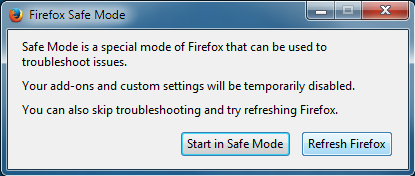
If the issue is not present in Firefox Safe Mode, your problem is probably caused by an extension, theme, or hardware acceleration. Please follow the steps in the Troubleshoot extensions, themes and hardware acceleration issues to solve common Firefox problems article to find the cause.
To exit Firefox Safe Mode, just close Firefox and wait a few seconds before opening Firefox for normal use again.
When you figure out what's causing your issues, please let us know. It might help others with the same problem.
Hi guigs2 ,
the problem persists in Safe Mode . The only way I can get rid of it is make a second mozilla profile . But this way I loose a lot of data I'd rather don't .
I thought someone might recognize what is that rtsp link and page format . Maybe it's something I have to change in about:config , my guess ?
I'm clueless :/
Just try to rename your user.js and see if that helps. .rtsp is an Apple QuickTime real-time streaming protocol file. Check that your quicktime is up to date.
ჩასწორების თარიღი: , ავტორი: Gnospen

