

このスレッドはアーカイブに保管されました。
必要であれば新たに質問してください。

Solved
アーカイブに保管済み
Unable to locate sync settings on home page

I am following instructions on how to sync: "Do these steps in Firefox on a computer that already has your Sync account set up.
  1. Click the Home button (or type about:home in the location bar) to bring up the default Firefox home page.
   2. At the bottom of the home page, click the Sync link to open the Sync settings window."
PROBLEM: THERE IS NOT A SYNC LINK ON THE DEFAULT FIREFOX HOME PAGE. THEREFORE I AM UNABLE TO OPEN THE SYNC SETTINGS WINDOW AND COMPLETE THE SYNC PROCESS WITH MY ANDROID.
I am following instructions on how to sync:
"Do these steps in Firefox on a computer that already has your Sync account set up.
1. Click the Home button (or type about:home in the location bar) to bring up the default Firefox home page.
2. At the bottom of the home page, click the Sync link to open the Sync settings window."
PROBLEM: THERE IS NOT A SYNC LINK ON THE DEFAULT FIREFOX HOME PAGE. THEREFORE I AM UNABLE TO OPEN THE SYNC SETTINGS WINDOW AND COMPLETE THE SYNC PROCESS WITH MY ANDROID.
選ばれた解決策
The about:home page that shows in the screenshot has a Sync button on the launch bar at the bottom.
すべての返信 (3)
Did you set up sync on your Mac (desktop) computer?
- Tools > Set up Sync
Yes, I did set it up on a Mac. Who knows what gremlins changed the page that opened when I clicked on the home button on the tool bar? So all I can say is that I'm grateful to the gremlins.
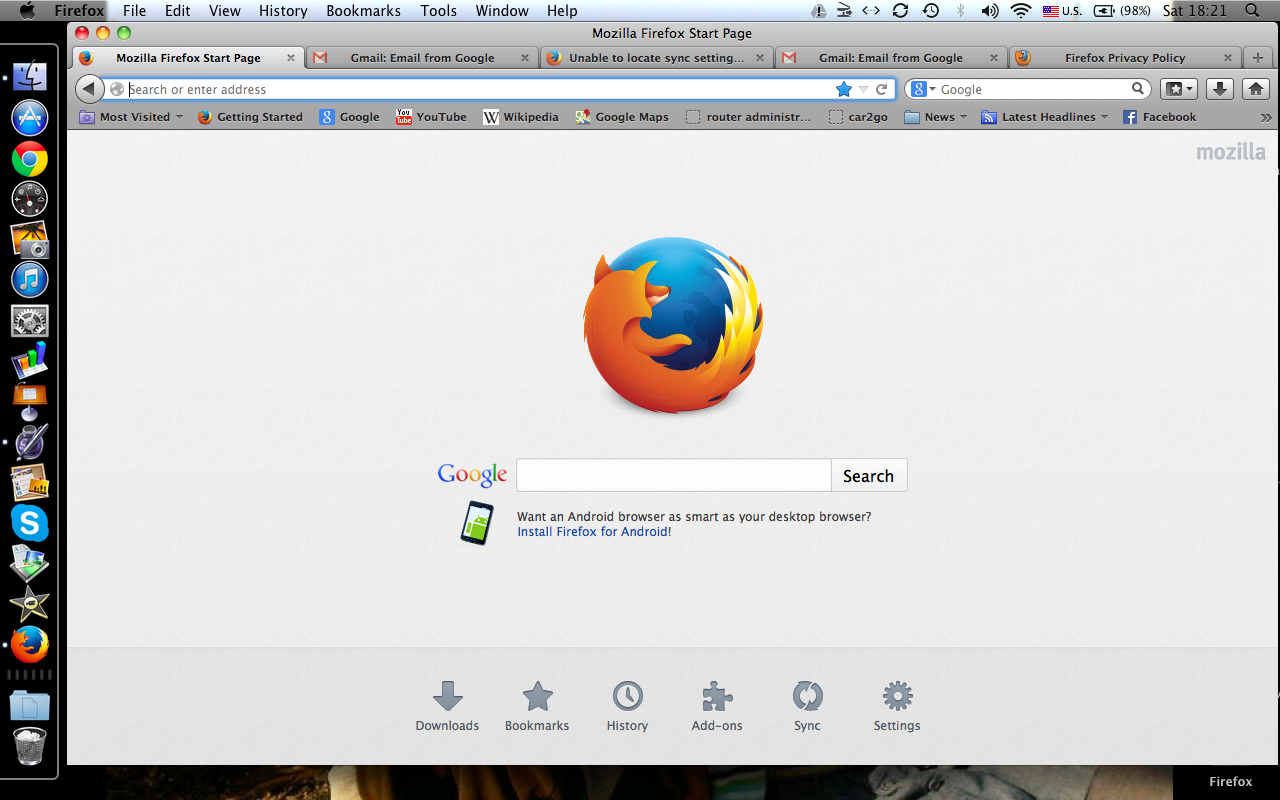
選ばれた解決策
The about:home page that shows in the screenshot has a Sync button on the launch bar at the bottom.