Displaying full URL

Can the full URL be displayed in btheb address bar. If I bwant to log on to an https site, I don't know if it is an https, or an http
すべての返信 (6)
hello, yes you can do that - enter about:config into the firefox location bar (confirm the info message in case it shows up) & search for the preference named browser.urlbar.trimURLs. double-click it and change its value to false.
Thanks for that - haven't got that preference in the list - I'm running Firefox 19.0 on a tablet computer using Android 4.1.1 - any ides:?
ops, sorry this advice was tailored for desktop versions of firefox - i'm not sure if/how this is achievable on tablet versions...
Current Firefox versions for desktop always show the secure https: protocol if it is used.
Is this different on mobile?
Is there some sort of Site Identity Button that shows that a secure connection is used?
There seem to be some differences. You can select a Desktop view, this shows a padlock item in the Address Bart. On one site, which I know is se4cure, i you type in the full address as https.... etc the site loads, and even if you select Desktop view, there is no indication that you're logged onto a secure site. So if you want to use Firefox to do some banking, then ............. If you use Google Chrome, this gives the fulkl address. Perhaps Chrome is the answer?

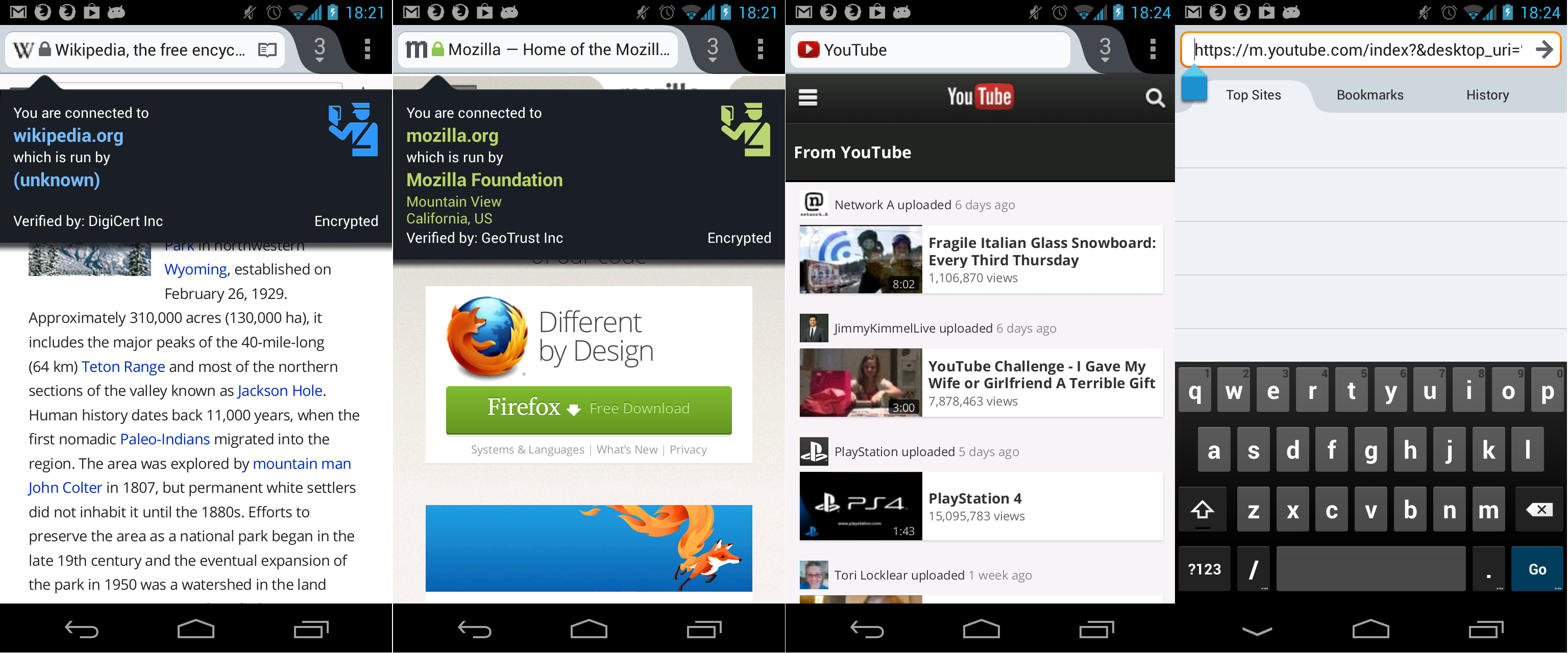
Firefox for Android is completely capable of negotiating a SSL connection to websites.
- A grey lock in the address bar shows a site that has a SSL connection (https)
- A Green lock in the address bar shows a site that has an EV-SSL connection (https)
- If no lock is present,
- The site is not using SSL (http)
- The site is using SSL (https) however the connection cannot be trusted due to the loading of non-SSL elements (contact the website owner in this case)
See the image attached to this post for reference.