


Play video without download

When I first started my Samsung Galaxy S II I could immediately start videos without downloading. There was no question as to which program I wanted to use. After installing various programs including Beta Firefox and Adobe Player, I am now always asked which program to use,Firefox,Internet or Google drive.
Internet option after loading video returns to displaying the original URL link but does not start the video.
Beta Firefox and Google Drive both downloads the video before playing it which takes ages for a large file.
Why can I not return to the original state of setting for Galaxy S II which immediately starts the video from the URL link similar to Firefox for Windows/PC?
すべての返信 (3)
Try entering this URL in Firefox for Windows PC which points to a video on my Google ´cloud´Drive: https://docs.google.com/open?id=0B3t9JwGWh4c3bFo4dXV2MnZBQnc
As you see,it executes the video immediately,without first downloading.
Why is the beta Firefox for Android not doing the same?
tore@yachtmarine.com
Tore
この投稿は sinbad990 により に変更されました
htc sensation here. same problem, except the stock browser will still stream. here's an example:
http://m.wimp.com/roboticgrippers/
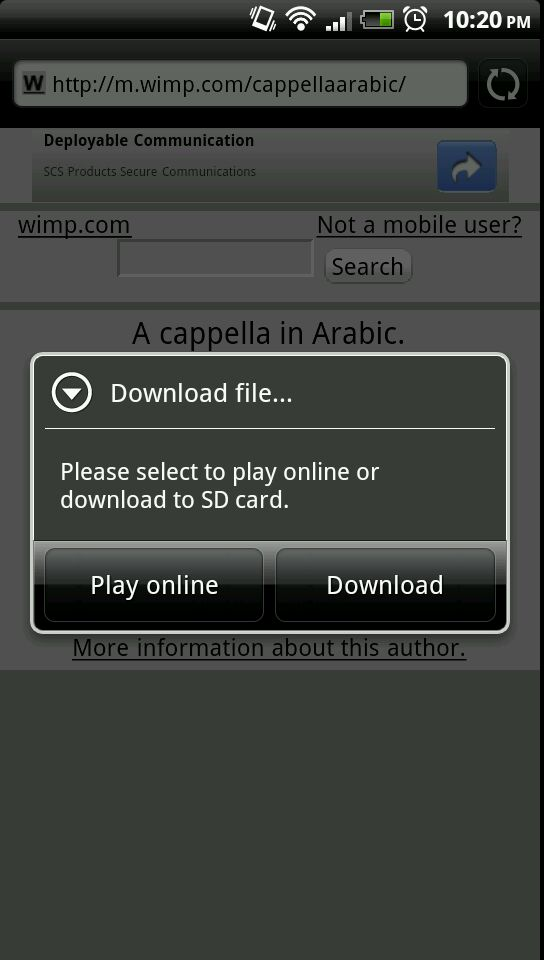
click the video or any other video on this site using Firefox, and I must download fully before watching. with the stock browser, I get an option like what's shown in the attached image, allowing streaming through the stock media streaming software.
Strange thing is,my desktop PC running Firefox starts videos immediately from my google cloud drive without downloading. This was also possible on my Galaxy S II in it´s ´virgin state´before downloading any browsers or programs. Now I am asked every time to select viewer,Internet,Firefox or Google Drive. Both Firefox and Google drive downloads the videos to memory before playing whilst Internet after some time downloading,re-displays the original URL the video it was called from?
Tore