


I deleted account but did not check to delete data and I can't find it after setting up account again.

I changed POP3 email password to an app password and Thunderbird would not recognize it even though I updated in Security. I was told to delete the Thunderbird account then set it back up which I did--I did not check the box to delete files. Finally the new account was able to bring in new emails (POP3) but the old folders/emails are not there.
I read that I should go to %appdata%, roaming, Thunderbird but the dates are from years ago--do I go further to find my data or is there another path or something else I should do?
Unless they were backed up somewhere within Thunderbird, I don't think I have any backup.
Can you please help? Thank you.
選ばれた解決策
help! said
It does have the yahoo-2 path but it doesn't allow me to change it by right clicking or by getting the cursor in there to change. Any other way to change it?
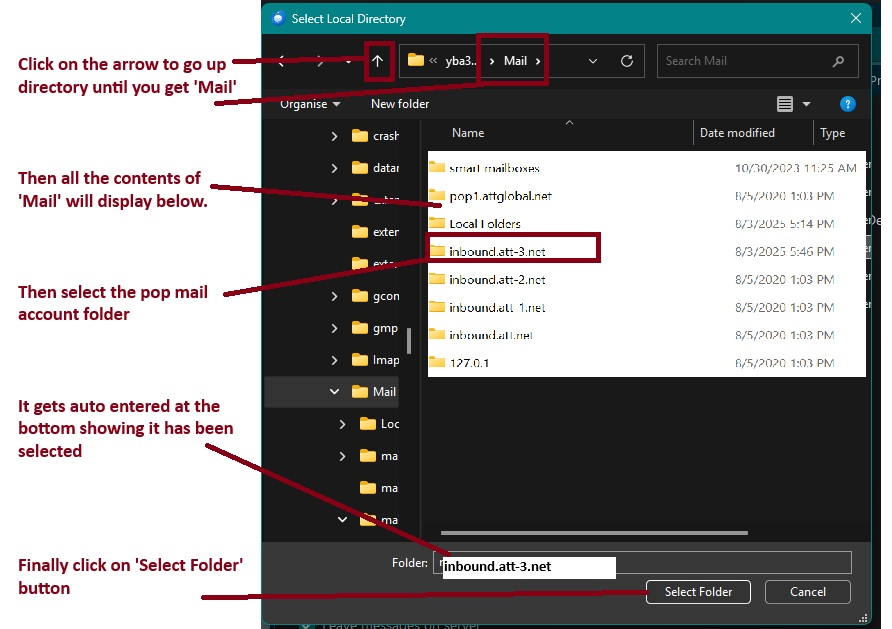
In Account Settings > Server Settings for that pop account 'Local directory':.....on the right click on the 'Browse' button It will open on the new empty pop.mail.yahoo-2.com account showing it's contents Just go back up to the 'Mail' folder and select the 'pop.mail.yahoo.com' folder, so that folder name appears in the 'Folder' section at bottom of window. then click on 'Select folder' button Then the Local Directory will say: C:\User.12-16\AppData\Roaming\Thunderbird\Profiles\wdw4oydo.default-release\Mail\pop.mail.yahoo.com
I've included an image which you can use as a guide. Obviously it may not be exactly as you see, but I'm sure you can use it to help select correct 'pop.mail.yahoo.com' folder.
すべての返信 (22)
選ばれた解決策
help! said
It does have the yahoo-2 path but it doesn't allow me to change it by right clicking or by getting the cursor in there to change. Any other way to change it?
In Account Settings > Server Settings for that pop account 'Local directory':.....on the right click on the 'Browse' button It will open on the new empty pop.mail.yahoo-2.com account showing it's contents Just go back up to the 'Mail' folder and select the 'pop.mail.yahoo.com' folder, so that folder name appears in the 'Folder' section at bottom of window. then click on 'Select folder' button Then the Local Directory will say: C:\User.12-16\AppData\Roaming\Thunderbird\Profiles\wdw4oydo.default-release\Mail\pop.mail.yahoo.com
I've included an image which you can use as a guide. Obviously it may not be exactly as you see, but I'm sure you can use it to help select correct 'pop.mail.yahoo.com' folder.
Thank you so much Christ1 for your help through this process; I knew I was in good hands when I saw your online handle. Thanks also to ToadHall.