


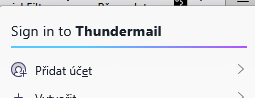
How to permanently remove "Sign into thundermail" from Thunderbird menu.
I use Thunderbird expluicitly because it is open source application not bound to any specific services. I am very dissapointed to find connection to "thundermail" build into application and WANT IT PHYSICALLY REMOVE from it.
I kindly ask to help in removing it from my copies of Thunderbird. Thank you.
すべての返信 (1)
The only way I know to remove this item is to use a certain CSS code in a userChrome.css file in the Thunderbird profile
• in Thunderbird go to Settings > General > scroll to bottom and click "Config Editor...", search for toolkit.legacyUserProfileCustomizations.stylesheets and toggle its value from false to true • open a text editor and copy + paste the following CSS code in the editor
#tbpro-menu-id-root {
display: none !important; }
• name the file userChrome.css , save it to your Desktop and remove the .txt suffixe your OS will add
• create a folder, name it chrome and move the userChrome.css file in folder chrome
• in Thunderbird go to Help >Troubleshooting Information > Profile Folder > Open Folder...., then exit Thunderbird
• move the folder chrome in the profile folder and restart Thunderbird