


followed pc txfer instructions - no joy

I have followed the instructions to txfer the profile to new PC W.11 - from W.10. T'bird says: "Your Thunderbird profile cannot be loaded. It may be missing or inaccessible."
I have the old folder from 'roaming' pasted in correctly - did it twice. No change.
I also have all my message folder ready on the new PC. These are held in a better location for bak up. When I moved to the last machine - nine years ago - I had exactly the same problem!
As new install will not load the profile I cannot get into it to tell it anything.
Suggestions welcome. SCA
選ばれた解決策
Okay, new plan. we can try a quick effort and see if that works. I am assuming the profile you have is exactly as it was on D. Try this::
- exit thunderbird
- rename the profiles.ini to profilesOLD.ini
- paste your old profiles.ini (the one that points to drive d) in its place
- now, copy the desired profile (JUST the profile) to drive D an rename it Mail so that it matches what the profile states.
- you now have the profile on D:\Mail and the profiles.ini points to it
- start thunderbird and report status
この投稿は david により に変更されました
すべての返信 (18)
There appears to have been a misstep. Please tell in detail how you did this. Thanks.
Hello, thank you. I followed your previous given numbered points list - twice! Sequence was; A) OLD: Back up 'mail' folder to USB B) NEW: Downloaded T'bird System shows 156.0 C) OLD: Opened and copied the T'bird sub-dir from Roaming to USB D) NEW: Started and cleared new sign up. E) Closed. Deleted newly created T'bird folder in Roaming = "Your Thunderbird profile cannot be loaded. It may be missing or inaccessible." Realised this might be incorrect. Then repeated the process just overwriting the two files. Same error msg.
May have to deinstall / Reinstall?? Many thanks. SCA
Your timing may have been minor.
- be sure thunderbird is not running
- if there is a thunderbird folder at appdata\roaming then delete it
- paste your thunderbird folder there and restart thunderbird. let me know. somehow, in your copy, the profiles.ini file got deleted. thunderbird opens that file first and it tells where the profile is.
Thank you for your continued help. Carefully followed - same result.
Should I uninstall/reinstall the Bird??? Many thanks, SCA
Did you download from thunderbird.net? If you downloaded from Microsoft, that solution won't work. Did you copy the Thunderbird folder completely? you should be able to see the profiles.ini file in that folder. It has the name of the profile. Reinstalling thunderbird isn't the issue if installed from thunderbird.net
Yes. Went to Mozilla Org as I was also getting a new Firefox. Yes both Profiles and Installs .ini files are there. I can send if you like.
Perhaps a clean install is for the best? Grateful thanks. SCA,
perhaps a screenshot of the thunderbird profile, a screenshot of the profiles folder, and a screenshot of the contents of the profiles.ini file. Thanks
The Tbird profile is in: Users > 'myname' > AppData > Roaming
Thank you for your patience. SCA
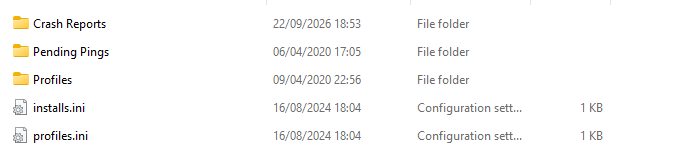
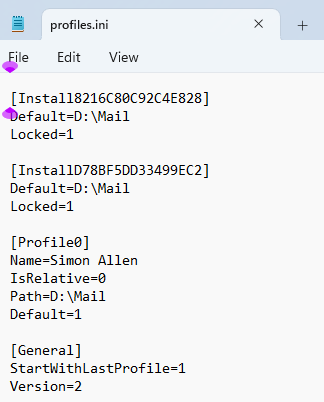
That shows that the profile Thunderbird is expecting is on drive D. It also appears that this was a custom setup. My suggestion is this:
- browse the appdata\thunderbird\profiles folder to confirm the profile you want
- then, use the profile manager to create the appropriate profiles.ini to launch that profile. Instructions for that are at https://support.mozilla.org/en-US/kb/profile-manager-create-and-remove-thunderbird-profiles
Another, possibly easier approach, would be this:
- copy your appdata\roaming\thunderbird folder elsewhere and then delete the one at appdata\roaming
- reinstall thunderbird, which will create a basic profile
- exit thunderbird
- now, browse the profiles.ini file to see the name of the profile set as default
- copy the actual profile you want within the backup you just did (just the profile itself, not the thunderbird folder), and place in the appdata\roaming\thunderbird\profiles folder
- finally, delete the basic profile and rename yours to the same name.
- restart thunderbird
Hello sorry to trouble you (again)!
Now back from biz trip and trying again. Following above have made clean install from Mozilla and held with old folder from app/roaming separate.
The newly created sub-folder 'profiles has 15.5Mb of data in 79 files of 28 folders. That sub-folder in my previous installation has ZERO files!!!
So not sure if that is what you expected?
Thanks, SCA.
First, please post a screenshot of the profile itself that you want. Not the thunderbird folder, but just the one profile you want. We'll work from there. :)
Thank You. This is the plain text from the 'profiles.ini' from the W.10 install on old machine. Incidentally, that machine is available and I can load it to check any other items if needs be. SCA [Install8216C80C92C4E828] Default=D:\Mail Locked=1
[InstallD78BF5DD33499EC2] Default=D:\Mail Locked=1
[Profile0] Name=Simon Allen IsRelative=0 Path=D:\Mail Default=1
[General] StartWithLastProfile=1 Version=2
That indicates you had the profile on another drive. Let's stick with your profile. Please post the screenshot. thanks.
Appreciated and I hope I understand you correctly.
It is my intention to have the Mail folders on Drive D once again. If that complicates matters too much, i will use the C: This is the profile that T'bird created this afternoon. [General] StartWithLastProfile=1 Version=2
[Profile0] Name=default-release IsRelative=1 Path=Profiles/obj6sv86.default-release
[Profile1] Name=default IsRelative=1 Path=Profiles/0gpwwrqj.default Default=1
[InstallD78BF5DD33499EC2] Default=Profiles/obj6sv86.default-release Locked=1
選ばれた解決策
Okay, new plan. we can try a quick effort and see if that works. I am assuming the profile you have is exactly as it was on D. Try this::
- exit thunderbird
- rename the profiles.ini to profilesOLD.ini
- paste your old profiles.ini (the one that points to drive d) in its place
- now, copy the desired profile (JUST the profile) to drive D an rename it Mail so that it matches what the profile states.
- you now have the profile on D:\Mail and the profiles.ini points to it
- start thunderbird and report status
この投稿は david により に変更されました
BRILLIANT.
Thank you once again for your help and patience. My IT skills are somewhat out of date!
Everything loaded with catch-up of recent posts.
Only curious thing - there are two 'Outbox' at the bottom of the left hand folders. This is not a big problem as it was like this on the W.10 install!!! I'm guessing, it's left over from a previous installation.
Many Thanks, Simon.
I am pleased that all works. Now, on the Outboxes: You have touched one of my weak areas, and forgiveness may not occur. :) There are true geniuses here, and I am not one. My style is to figure out how to remove the problem, not necessarily the purest way. For example, I recently set up a gmx account on my PC with unified view. But I noticed that in a separate entry was an Outbox. What the heck is that? My guess is that it is for mail ready to send later. So I just unsubscribed it and it disappeared. From my perspective, the problem is solved. So, in your case, I would first check to see if an Outbox folder serves your needs with a trial. Then unsubscribe from the other one. Okay, not pure and not very technical, but life is short and I do not want "Knows how to remove Outbox' on my grave marker. :) See if you can just unscribe it. And then celebrate that your system is working. For a BACKUP, I suggest doing this::
- exit thunderbird
- copy the appdata\roaming\thunderbird folder to external media
- also copy D:\Mail to external media
Should you need to restore, do this:
- install and exit thunderbird
- at appdata\roaming\ DELETE the thunderbird folder
- copy your backup Thunderbird folder to appdata\roaming
- place your backed up profile on drive D with same name of Mail
- start thunderbird and you're done
Finally print or otherwise save this post so that you have the info for next time. People often forget that their profile is not on the C drive and then are puzzled when a restore doesn't work.
It was fun assisting you. I'm glad all is working. :)
Thank you. Neither Outbox permitted itself to be deleted. They are tenacious!
No prob.
Cheerio. Simon.