


Firefox browser’s VPN shows the location as the United States, but the actual IP address is in Manila, Philippines.

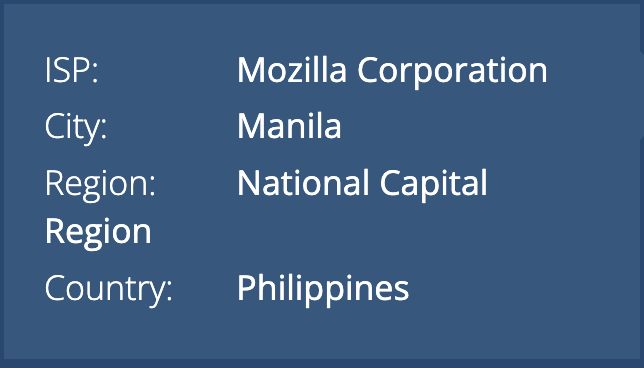
Firefox’s built-in VPN shows the VPN location as the United States, but websites and IP-location services detect my IP address as being in Manila, Philippines. Because the IP address is not actually located in the United States, I encounter frequent CAPTCHA challenges and location-related issues.
Please investigate whether the VPN is routing my traffic through the selected U.S. location correctly. Firefox version: 156.0
Thank you for your assistance.
この投稿は msmith1407 により に変更されました
すべての返信 (2)
I’d first check whether the IP is actually being routed through the VPN. With Firefox’s built-in VPN, the selected country is supposed to be where your browsing traffic is routed, but IP-location databases can sometimes show a different location for the VPN’s address.
Try checking the public IP with a couple of different IP-location sites while the VPN is connected. If all of them show Manila, then I’d report it to Mozilla since there have been cases where the selected VPN location wasn’t being applied correctly.
Also make sure Firefox is fully updated and that no other VPN/proxy extension is interfering with the connection.
Multiple IP location websites show that the IP address is located in Manila, Philippines, while the browser’s VPN indicates that the location is in the United States.
The browser is up to date.
How can I report this issue to Mozilla? I can only find Mozilla support articles.

この投稿は msmith1407 により に変更されました