


Looking for someone familiar with Thunderbird 115.18.0 (64-bit) on how it creates personal folders

After a long explanation, I tried to add a file and lost everything. Starting over! After using TB for over 30 years, I accumulated a large number of personal folders to archive files to. Due to confusion on my part about pass words in Proton Mail and their Bridge, I had to reinstall my ProtonMail account into Thunderbird. Because all my personal folders were connected with the old "account" name, I didn't remove it, and the new addition seemed to be working fine.
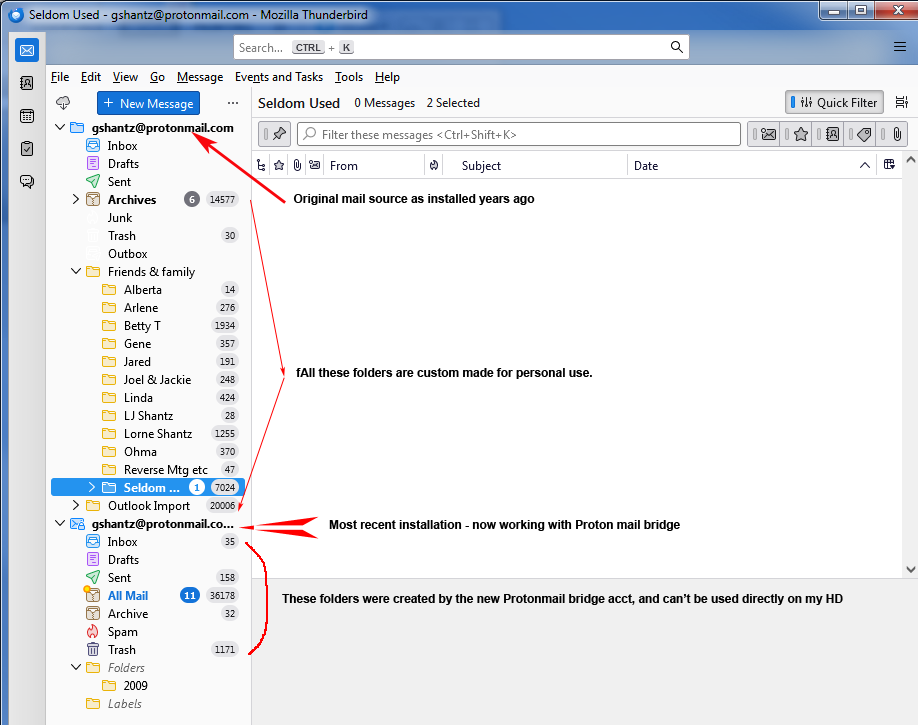
After doing some house cleaning to remove duplicate and obsolete files, I wanted to move the folders attached to the old account name, under the new name. I thought I could carefully move my personal folders from the old account, back under the new Protonmail account. Sadly, that doesn't work like that. What I did find was that the original folders which come under the original "account", were created with an older version of TB, which put them in a folder on my HD. But the new default folders ("inbox", "draft", "sent" etc.) are mirrors of the Protonmail Bridge, which is NOT what I want.
So I need someone that knows how to either place the old folders back under the NEW "account", or how to create new folders that ARE on the HD, and then move the files from one place to the other.
Just to help clarify, here's the location of the old folders as per the "properties" info.
mailbox:///E:/thunderbird data/thunderbird/yetudx3p.default/Mail/Local Folders/Friends & family
You can see the address for this folder is on my Drive E: I can go directly to that address on my drive E and see each of the files.
imap://gshantz%40protonmail.com@127.0.0.1/Folders/2009
This folder is from the NEW account of Protonmail - bridge, and is obviously the web address of Protonmail. It is NOT editable, unlike the above location on my HD E:.
Any help or suggestion would be greatly appreciated, gshantz
すべての返信 (1)

There is a "Copy To" function in Thunderbird. You can use it to copy your emails/folders between different accounts.
For example, you can create a backup email account pointing to your HDD using Maildir format. After activating this backup account, you can select your emails/folders and copy them to the backup account. These emails/folders will then be saved to your HDD and can be access via the backup account just like local files.