


URL bar not highlighting text after a recent update

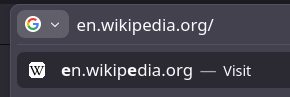
After an update for Firefox Developer Edition on Arch Linux (I don't know which), my URL bar doesn't show the selected text when typing or pressing Ctrl+A.
In the uploaded image, you can see i typed "e", but it doesn't highlight the entire en.wikipedia.org url. the second result still shows the e's in the URL bolded though.
I've tried disabling hardware acceleration, changing my GTK theme, and also changed my Firefox Theme, yet none work.
すべての返信 (5)

Yeah, i have the same issue. It is really frustrating. CTRL+A is not working on mac. When i press it the edit option is flickering but nothing works...Also after i try CTRL+A than delete the text with CTRL+Backspace i can't type anything there...
Please, fix it!
It works on Firefox Alpenglow, but not dark mode, light mode, or the fallback theme when theres no theme selected. What could possibly be happening?
@Solarite You are a life saver. With Firefox Alpenglow it is working. Thank you so much!
Hello
A similar discussion https://support.mozilla.org/en-US/questions/1596036
I assume the text highlight only works purely because Alpenglow and other themes define their own selection color for the URL bar.