


VPN is turned off by default how can I change this

I have installed Firefox VPN, but it is disabled by default so I have to enable it whenever I use it . How can I change the default setting to make it on by default
すべての返信 (11)
Try to enter about:config in the address bar and flip the following preferences to true:
- browser.ipProtection.autoStartEnabled
- browser.ipProtection.autoRestoreEnabled
Sorry that didnt work. I tried both, the each independently. I still see the VPN button but have to enable it manually. In case it helps here is the full list: Browser.ipProtection.added true browser.ipProtection.autoRestoreEnabled false browser.ipProtection.autoStartEnabled false browser.ipProtection.autoStartPrivateEnabled false browser.ipProtection.bandwidth.enabled false browser.ipProtection.bandwidth.maxInGb 50 browser.ipProtection.bandwidthThreshold 0 browser.ipProtection.bandwidthWarningDismissedThreshold {"infobar":0,"panel":0} browser.ipProtection.blockIPProtectionCallouts false browser.ipProtection.egressLocation REC browser.ipProtection.enabled true browser.ipProtection.entitlementCache {"subscribed":false,"uid":3614683,"maxBytes":"53687091200","limited_bandwidth":false} browser.ipProtection.everOpenedPanel true browser.ipProtection.features.autoStart false browser.ipProtection.features.siteExceptions true browser.ipProtection.fxa.useActivateFlow true browser.ipProtection.guardian.endpoint https://vpn.mozilla.org/ browser.ipProtection.hasUpgraded false browser.ipProtection.locationButtonBadgeDismissed true browser.ipProtection.locationListCache [{"name":"United Kingdom","code":"GB","cities":[{"name":"United Kingdom","code":"EGLC","servers":[{"port":2499,"hostname":"eglc860.m1.fastly-masque.net","quarantined":false,"protocols":[{"name":"connect","host":"eglc860.m1.fastly-masque.net","port":2499,"scheme":"https"}]}]}]},{"name":"Singapore","code":"SG","cities":[{"name":"Singapore","code":"WSAT","servers":[{"port":2499,"hostname":"wsat188.m1.fastly-masque.net","quarantined":false,"protocols":[{"name":"connect","host":"wsat188.m1.fastly-masque.net","port":2499,"scheme":"https"}]}]}]},{"name":"New Zealand","code":"NZ","cities":[{"name":"New Zealand","code":"AKL","servers":[{"port":2499,"hostname":"akl103.m1.fastly-masque.net","quarantined":false,"protocols":[{"name":"connect","host":"akl103.m1.fastly-masque.net","port":2499,"scheme":"https"}]}]}]},{"name":"Austria","code":"AT","cities":[{"name":"Austria","code":"VIE","servers":[{"port":2499,"hostname":"vie63.m1.fastly-masque.net","quarantined":false,"protocols":[{"name":"connect","host":"vie63.m1.fastly-masque.net","port":2499,"scheme":"https"}]}]}]},{"name":"Sweden","code":"SE","cities":[{"name":"Sweden","code":"ESSB","servers":[{"port":2499,"hostname":"essb127.m1.fastly-masque.net","quarantined":false,"protocols":[{"name":"connect","host":"essb127.m1.fastly-masque.net","port":2499,"scheme":"https"}]}]}]},{"name":"Spain","code":"ES","cities":[{"name":"Spain","code":"LETO","servers":[{"port":2499,"hostname":"leto235.m1.fastly-masque.net","quarantined":false,"protocols":[{"name":"connect","host":"leto235.m1.fastly-masque.net","port":2499,"scheme":"https"}]}]}]},{"name":"Japan","code":"JP","cities":[{"name":"Japan","code":"RJTF","servers":[{"port":2499,"hostname":"rjtf770.m1.fastly-masque.net","quarantined":false,"protocols":[{"name":"connect","host":"rjtf770.m1.fastly-masque.net","port":2499,"scheme":"https"}]}]}]},{"name":"Bulgaria","code":"BG","cities":[{"name":"Bulgaria","code":"SOF","servers":[{"port":2499,"hostname":"sof151.m1.fastly-masque.net","quarantined":false,"protocols":[{"name":"connect","host":"sof151.m1.fastly-masque.net","port":2499,"scheme":"https"}]}]}]},{"name":"Mexico","code":"MX","cities":[{"name":"Mexico","code":"MMQT","servers":[{"port":2499,"hostname":"mmqt107.m1.fastly-masque.net","quarantined":false,"protocols":[{"name":"connect","host":"mmqt107.m1.fastly-masque.net","port":2499,"scheme":"https"}]}]}]},{"name":"Malaysia","code":"MY","cities":[{"name":"Malaysia","code":"KUL","servers":[{"port":2499,"hostname":"kul98.m1.fastly-masque.net","quarantined":false,"protocols":[{"name":"connect","host":"kul98.m1.fastly-masque.net","port":2499,"scheme":"https"}]}]}]},{"name":"Germany","code":"DE","cities":[{"name":"Germany","code":"MUC","servers":[{"port":2499,"hostname":"muc139.m1.fastly-masque.net","quarantined":false,"protocols":[{"name":"connect","host":"muc139.m1.fastly-masque.net","port":2499,"scheme":"https"}]}]}]},{"name":"South Africa","code":"ZA","cities":[{"name":"South Africa","code":"JNB","servers":[{"port":2499,"hostname":"jnb70.m1.fastly-masque.net","quarantined":false,"protocols":[{"name":"connect","host":"jnb70.m1.fastly-masque.net","port":2499,"scheme":"https"}]}]}]},{"name":"Denmark","code":"DK","cities":[{"name":"Denmark","code":"CPH","servers":[{"port":2499,"hostname":"cph232.m1.fastly-masque.net","quarantined":false,"protocols":[{"name":"connect","host":"cph232.m1.fastly-masque.net","port":2499,"scheme":"https"}]}]}]},{"name":"Norway","code":"NO","cities":[{"name":"Norway","code":"OSL","servers":[{"port":2499,"hostname":"osl65.m1.fastly-masque.net","quarantined":false,"protocols":[{"name":"connect","host":"osl65.m1.fastly-masque.net","port":2499,"scheme":"https"}]}]}]},{"name":"Belgium","code":"BE","cities":[{"name":"Belgium","code":"BRU","servers":[{"port":2499,"hostname":"bru148.m1.fastly-masque.net","quarantined":false,"protocols":[{"name":"connect","host":"bru148.m1.fastly-masque.net","port":2499,"scheme":"https"}]}]}]},{"name":"Netherlands","code":"NL","cities":[{"name":"Netherlands","code":"EHRD","servers":[{"port":2499,"hostname":"ehrd229.m1.fastly-masque.net","quarantined":false,"protocols":[{"name":"connect","host":"ehrd229.m1.fastly-masque.net","port":2499,"scheme":"https"}]}]}]},{"name":"Italy","code":"IT","cities":[{"name":"Italy","code":"MXP","servers":[{"port":2499,"hostname":"mxp69.m1.fastly-masque.net","quarantined":false,"protocols":[{"name":"connect","host":"mxp69.m1.fastly-masque.net","port":2499,"scheme":"https"}]}]}]},{"name":"Thailand","code":"TH","cities":[{"name":"Thailand","code":"BKK","servers":[{"port":2499,"hostname":"bkk231.m1.fastly-masque.net","quarantined":false,"protocols":[{"name":"connect","host":"bkk231.m1.fastly-masque.net","port":2499,"scheme":"https"}]}]}]},{"name":"Chile","code":"CL","cities":[{"name":"Chile","code":"SCL","servers":[{"port":2499,"hostname":"scl222.m1.fastly-masque.net","quarantined":false,"protocols":[{"name":"connect","host":"scl222.m1.fastly-masque.net","port":2499,"scheme":"https"}]}]}]},{"name":"France","code":"FR","cities":[{"name":"France","code":"LFPB","servers":[{"port":2499,"hostname":"lfpb115.m1.fastly-masque.net","quarantined":false,"protocols":[{"name":"connect","host":"lfpb115.m1.fastly-masque.net","port":2499,"scheme":"https"}]}]}]},{"name":"Colombia","code":"CO","cities":[{"name":"Colombia","code":"SKBO","servers":[{"port":2499,"hostname":"skbo234.m1.fastly-masque.net","quarantined":false,"protocols":[{"name":"connect","host":"skbo234.m1.fastly-masque.net","port":2499,"scheme":"https"}]}]}]},{"name":"Australia","code":"AU","cities":[{"name":"Australia","code":"YSBK","servers":[{"port":2499,"hostname":"ysbk106.m1.fastly-masque.net","quarantined":false,"protocols":[{"name":"connect","host":"ysbk106.m1.fastly-masque.net","port":2499,"scheme":"https"}]}]}]},{"name":"Canada","code":"CA","cities":[{"name":"Canada","code":"CA","servers":[{"port":2499,"hostname":"ca.m1.fastly-masque.net","quarantined":false,"protocols":[{"name":"connect","host":"ca.m1.fastly-masque.net","port":2499,"scheme":"https"}]}]}]},{"name":"Finland","code":"FI","cities":[{"name":"Finland","code":"HEL","servers":[{"port":2499,"hostname":"hel141.m1.fastly-masque.net","quarantined":false,"protocols":[{"name":"connect","host":"hel141.m1.fastly-masque.net","port":2499,"scheme":"https"}]}]}]},{"name":"United States","code":"US","cities":[{"name":"United States","code":"US","servers":[{"port":2499,"hostname":"us.m1.fastly-masque.net","quarantined":false,"protocols":[{"name":"connect","host":"us.m1.fastly-masque.net","port":2499,"scheme":"https"}]}]}]},{"name":"Ireland","code":"IE","cities":[{"name":"Ireland","code":"DUB","servers":[{"port":2499,"hostname":"dub43.m1.fastly-masque.net","quarantined":false,"protocols":[{"name":"connect","host":"dub43.m1.fastly-masque.net","port":2499,"scheme":"https"}]}]}]},{"name":"Portugal","code":"PT","cities":[{"name":"Portugal","code":"LIS","servers":[{"port":2499,"hostname":"lis149.m1.fastly-masque.net","quarantined":false,"protocols":[{"name":"connect","host":"lis149.m1.fastly-masque.net","port":2499,"scheme":"https"}]}]}]},{"name":"Recomended Location","code":"REC","cities":[{"name":"Recomended City","code":"REC","servers":[{"port":2499,"hostname":"p.m1.fastly-masque.net","quarantined":false,"protocols":[{"name":"connect","host":"p.m1.fastly-masque.net","port":2499,"scheme":"https"}]}]}]}] browser.ipProtection.log false browser.ipProtection.onboardingMessageMask 7 browser.ipProtection.openedPanelWithLocation true browser.ipProtection.optedOut false browser.ipProtection.siteExceptionsHintsEnabled true browser.ipProtection.stateCache ready browser.ipProtection.upgradeNotAvailable false browser.ipProtection.usageCache {"max":null,"remaining":null,"reset":null,"unlimited":true} browser.ipProtection.userEnableCount 3 browser.ipProtection.userEnabled false
Hello
A space for users to give product feedback https://support.mozilla.org/en-US/kb/what-mozilla-connect
https://connect.mozilla.org/t5/ideas/firefox-vpn-automatic-start-setting-option/idi-p/128199
Hmmm, it should work. These preferences are false now. Are they typed with bold or normal font on your device?
Try 1 - Go to configuration editor https://support.mozilla.org/en-US/kb/about-config-editor-firefox 2 - Enter a search term browser.ipProtection.autoStartEnabled You can double-click on the preference to set the value to true 3 - Enter a search term browser.ipProtection.features.autoStart You can double-click on the preference to set the value to true
Yes, I think Agent V is right. There's browser.ipProtection.features.autoStart that should expose this feature in the settings.
Result below Turn on VPN automatically When I open Firefox
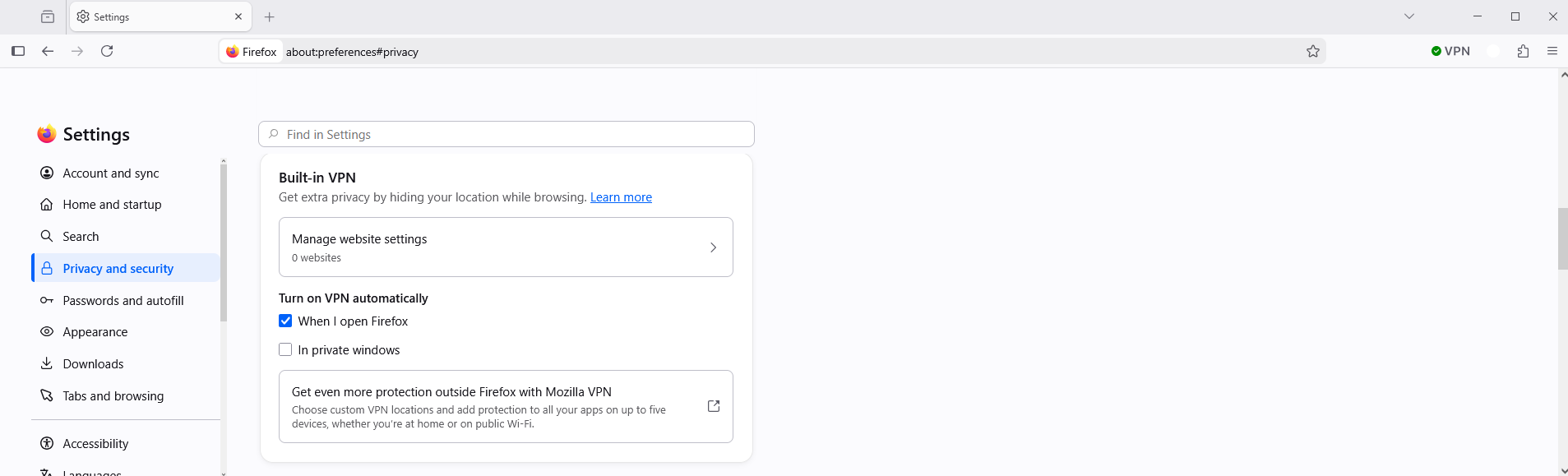
Thanks for your help folks but after various attempts I was able to view this in Setting but when I tried to enabe it kept asking me to enable, then to turn on VPN, and kept going in circles. I also gotr the message unable to connect to VPN try later .Is there a way to reset these setting and start from scratch - should I just uninstall Foirzefox then reinstall ?
ALL. Latest update it is now working . I looked at the changes and undid them then made the changes suggested one by one. Eventually I got to the point where it said VPN unavailable, although I choose anything other than default and it worked. Now I am able to choose the default location, and it stays on when I close and re-open the browser. It seems there is some latency somewhere so in making those changes suggested I just had to wait. Thanks both for your great help in resolving this.
Reinstalling won't help you.
Please see my last reply (our messages must have crossed). All now working. It seems changes to VPN parameters do not work quickly there is some latency involved in changing . Thanks again for your help.