


how do you get back to email inbox from an open email without scrolling backward through numerous openings

how do you get back to email inbox from an open email without having to scroll backward through countless previous openings to get back to inbox and click to reveal it again
すべての返信 (1)
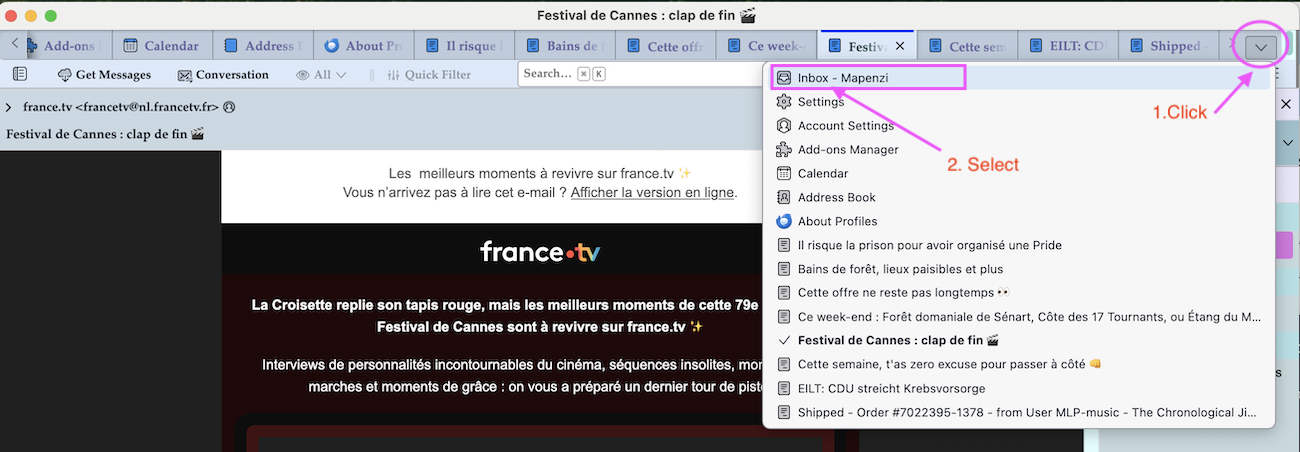
I suppose that you open your messages in new tabs in the tab bar to read them without closing the tabs later. After a while there will be so many messages opened in individual tabs that the tab bar cannot display all of them. Since each new tab opens on the right end of the tab bar, the Inbox mail tab will disappear from the left side of the tab bar.
a) Use the keyboard shortcut Ctrl + 1 to switch to the mail tab with your Inbox. or b) if you don't remember the shortcut, click on the down arrow ∨ symbol on the right end of the tab bar and select "Inbox" in the list of open tabs (image)
この投稿は Mapenzi により に変更されました