


Is this "threading"?

Two identical spam emails came in, and I deleted both from my Inbox. Both had attachments. Deleting them moved them to the Trash folder. When I went to the Trash folder, I found both emails had been combined into one file. Is that "threading"? I don't want any emails to be combined together EVER. Previously I had checked the "Unthreaded" box in Settings; so if this was threading, why did it happen?
Another question: I couldn't find anything to do with this combined file but to delete it. Did the act of deleting it also delete the attachments, which probably contained viruses?
This "threading" business has been going on for years now. I always check the options that supposedly disable it, but then it keeps happening.
すべての返信 (8)
On your question, you can always check threading for a folder by clicking view>sort by and seeing if threading is ticked. You can permanently stop threading, but it's a bit of one-time work. Here is my info on threading:
This is the official (to my knowledge) documentation. Well worth the read
https://support.mozilla.org/en-US/kb/message-threading-thunderbird
Simple Approach if just a few folders Here is my own documentation on threading, duplicating the above, but it may help: You need to highlight each folder and click View>sort by>unthreaded. If this applies to just a few folders, just repeat the process as necessary. If you have many folders or plan to add many new folders, you may wish a different approach, below:
FOR NEW FOLDERS See Settings>Appearance
------------
FOR EXISTING FOLDERS These steps may help: To set many *existing* folders, follow these steps: This must be done on an account by account basis.
- select table view - the icon just to right of 'quick filter' button above message list pane
- select a message folder and apply all desired attributes - View>sort by from menu bar (if not shown, click alt key)
- click the icon at right side of column display in message list pane
- select the entry near bottom 'Apply current view to...'
- highlight 'folder and children'
- move mouse left to see account name and move left again to display all account folders. Now CLICK. a small menu will appear to confirm setting all folders within that account.
- repeat steps for each account
FOR FUTURE THUNDERBIRD INSTALLATIONS
- -To change default for *new* folders, In config editor, you can change default that applies to NEW folders you set up:
mailnews.default_view_flags 0 =unthreaded (NOTE: Config editor is at settings>general near bottom of pane)
- - create a simple text file with name of user.js with these lines:
    // Set default threading to UNthreaded  ###   <== this line is optional, just for documentation
    user_pref("mailnews.default_view_flags", 0);
- - install Thunderbird and exit prior to setting up accounts
- - copy the user.js file into the profile
- - now, when you start Thunderbird, unthreading will be the default. Problem solved. #
Thank you for your help. I didn't realize that threading was either enabled or disabled for each folder. As it turns out, it was disabled for the Inbox, but it was enabled for Trash. I will make sure that it is disabled for all folders.
I still need to know if, when I delete an email with an attachment, the attachment is deleted too.
この投稿は Purebeads により に変更されました

Hi David
Thank you for this, I think I followed your instructions carefully. But my emails still show the effects of threading and are not in a simple date order. And also some of header information and date information has been modified or deleted and that is unacceptable.
Since some of my emails are of a legal nature it is impperitive that they are presented complete and unmodified by Thunderbird. Threading does modify them.
I need to delete from my computer all the emails that have been downloaded by thunderbird so that I cansort them out. I have looked in user folders on my c-driive and not found anything relavant. Please inform me where my emails are stored on my computer and how I can delete them. Clearly my emails on my external email server must not be touched.
Can you give me any information as to when Mozilla will update Thunderbird so that, by default, it will allow emails in a form that has not been modified by Thunderbird. Theading does modify them.
Is a solution for me to mount an earlier version of Thunderbird to replace the current version. This would probaby require that the existing version of Thunderbird be removed entirely including the down loaded emails.
I am beginning to realise that I may have to leave Mozilla and its useful software and find another company. In that case I will stop my periodic payment as a contribtion to Mozilla funds that I have willingly given over many years to ensure continuation.
I hope you will be able to answer the points I have raise above. If you are unable to, please will you pass this up your management structure.
Regards
Nick Humphris
First, this forum is supported by volunteers; we have no tie to the management structure. Now, most settings that could be changed are for NEW folders. if you have a folder that still has threading, you can click view>sort by and click to unthreaded. Threading does NOT modify the messages. If messages are not sorted in your preference, then you can use the view>sort by to set your preference. Reverting to a prior release is never recommended as that usually causes serious problems. What version of thunderbird are you using?

I have tried everything suggested to get rid of this (damn) threading phenomenon.
In 'view>Sort by ', 'unthreaded' is checked. In 'view>threads' there is no offer of 'no threads'. In my copy 'all' is checked. I tried checking other choices, and bizarre things happened that I certainly don't want. But everything is still threaded the way we have been complaining about.
When will software engineer realize that software is supposed to SAVE time, not waste it?
I'm glad to see that people are still posting on this thread. "Threading" in Thunderbird is one of the worst features they ever came up with. It has caused me constant frustration over the years. If I want to see all my emails from one person, all I have to do is to sort my email list by Correspondents. I certainly don't want to see all of the emails grouped into one file.
As an older person who has owned personal computers since the 1980's, it has been my experience that when a software publisher revises its software, it always releases it with the new features turned on by default. That's what Mozilla did when they added threading to Thunderbird. What nightmare that was for me.
Another mistake that software publishers make is they focus on adding new features without first making sure that the old features are all working properly.
Regarding this "threading" feature, there needs to be one master setting in the program that disables threading for EVERY folder at once.
Purebeads said
I'm glad to see that people are still posting on this thread. "Threading" in Thunderbird is one of the worst features they ever came up with. It has caused me constant frustration over the years. If I want to see all my emails from one person, all I have to do is to sort my email list by Correspondents. I certainly don't want to see all of the emails grouped into one file.
It is a case of different preferences for different folks. I came to use Thunderbird back about 2005 because of threading the Microsoft applications I used at the time did not support it and the Linux products were mostly primitive in their execution. I had started writing my own mail client with the express purpose of having threaded emails when I discovered Thunderbird. So you dislike the changed default, I have no real interest because mine was already threaded when the change came in. But there is certainly nothing new about it, it has been a part of Thunderbird for 20 years, Much longer than you claim to have used it.
https://support.mozilla.org/en-US/questions/1179885
As an older person who has owned personal computers since the 1980's, it has been my experience that when a software publisher revises its software, it always releases it with the new features turned on by default. That's what Mozilla did when they added threading to Thunderbird. What nightmare that was for me.
Actually no. Thunderbird did not enforce the new default. While I do not support the default change to threaded mail, the intent was for all existing users to have no change to their settings. But don't believe me, read the implementation bug for threading. https://bugzilla.mozilla.org/show_bug.cgi?id=1764842 I tried at the time to raise the issue because it was not satisfactory. I was shouted down https://bugzilla.mozilla.org/show_bug.cgi?id=1787599
Unfortunately anyone that created a new user profile got the new defaults and there were many of them because the profile per install was very buggy when released causing innumerable issues for folk loosing their existing mail and contacts. It is only a little better now, as folk still upgrade and loose everything and many never realize it happened. They just insert their account details again when asked and complain about their settings for things like threading or contacts being lost.
Another mistake that software publishers make is they focus on adding new features without first making sure that the old features are all working properly.
There is an ideas and feedback forum. it is linked to from Thunderbird help menu as this one is. Perhaps use it to share your views. They are actually off topic in the support forum. This is not however Qualcomm and it is not Eudora and their failed attempt to create an open source product that existed for exactly one release. Thunderbird is a mature product and while there are bugs. Your complaints about threading and the conscious decisions made by the development team are not bugs. They are features that you do not like.
Regarding this "threading" feature, there needs to be one master setting in the program that disables threading for EVERY folder at once.
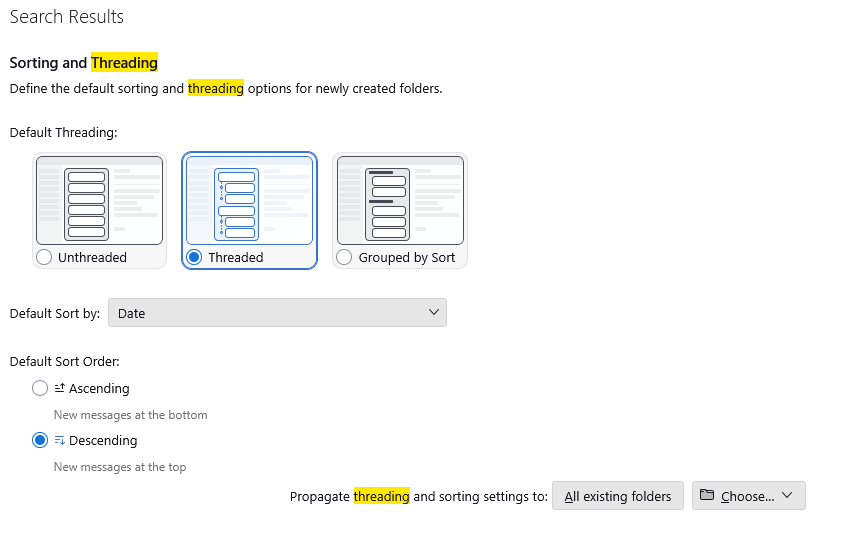 I assume you missed the "Propagate threading and sorting settings to All existing folders" in settings.
You are asking here for a setting that exists and has done for some time.
I assume you missed the "Propagate threading and sorting settings to All existing folders" in settings.
You are asking here for a setting that exists and has done for some time.