


Thread management

I use Thunderbird and have done for years. Nowadays new messages seem to be placed in the inbox within previous email threads within that thread. This often means that they are not flagged as new emails. They get buried in old threads and never brought to notice, consequently are never seen. This means I miss a lot of emails.
Is there any selectable option that brings all messages into the inbox individually and visibly, so that they are not missed, and always seen. That is, stops emails being placed within an existing thread, no matter what its content is. I am very happy to reorganise my incoming mails manually.
選ばれた解決策
Many thanks. I actually explored a little more and did find my way to the right options. Not sure ahat I did wrong first up, but found my way there eventually. The initial instructions were fine, so I must have presseds a wrong button somewhere. All seemed to be selected OK, and it will be good just to sit and watch, and watch it all work now.
Many thanks for taking the time to reply. Chris
すべての返信 (4)
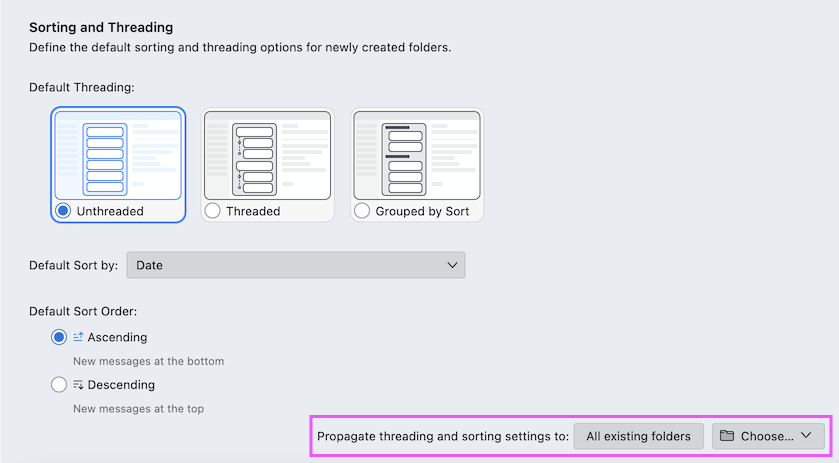
Go to Settings > Appearance > Sorting and Threading, activate the radio-button "Unthreaded", select your default sort order and click the button "All existing folders" if you want to propagate your settings to all folders. Otherwise choose the folder(s) in which you want to propagate them.
Unfortunately I may have misled with my question. I am using Thunderbird. In Settings it does not have an Appearance checklist, and there is no option for Sorting and Threading. My apologies. Christ.

chris.a1 said
Unfortunately I may have misled with my question. I am using Thunderbird. In Settings it does not have an Appearance checklist, and there is no option for Sorting and Threading. My apologies. Christ.
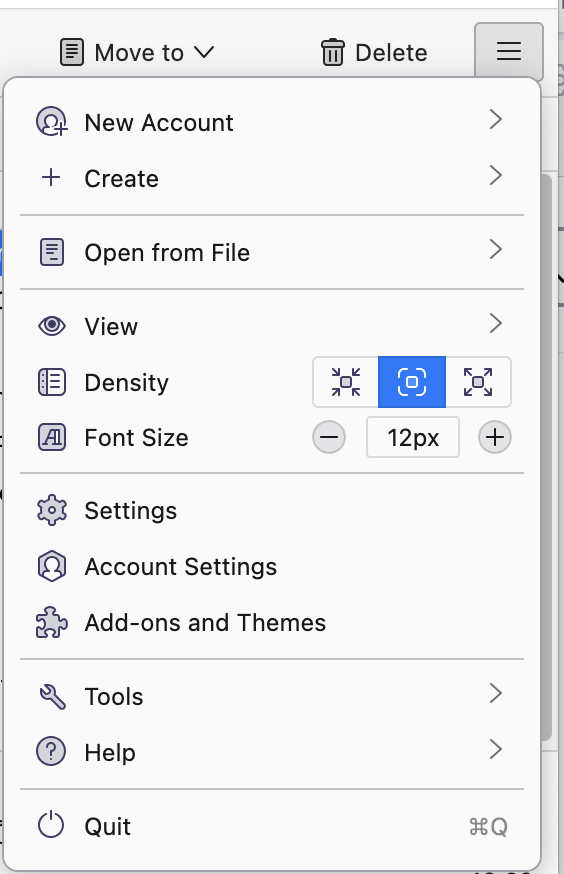
Are you looking in Thunderbird's application-level settings, not operating system settings or e-mail account settings? You can find them under the ≡ menu. See my attached screen image.
選ばれた解決策
Many thanks. I actually explored a little more and did find my way to the right options. Not sure ahat I did wrong first up, but found my way there eventually. The initial instructions were fine, so I must have presseds a wrong button somewhere. All seemed to be selected OK, and it will be good just to sit and watch, and watch it all work now.
Many thanks for taking the time to reply. Chris