


Poor translation and setup

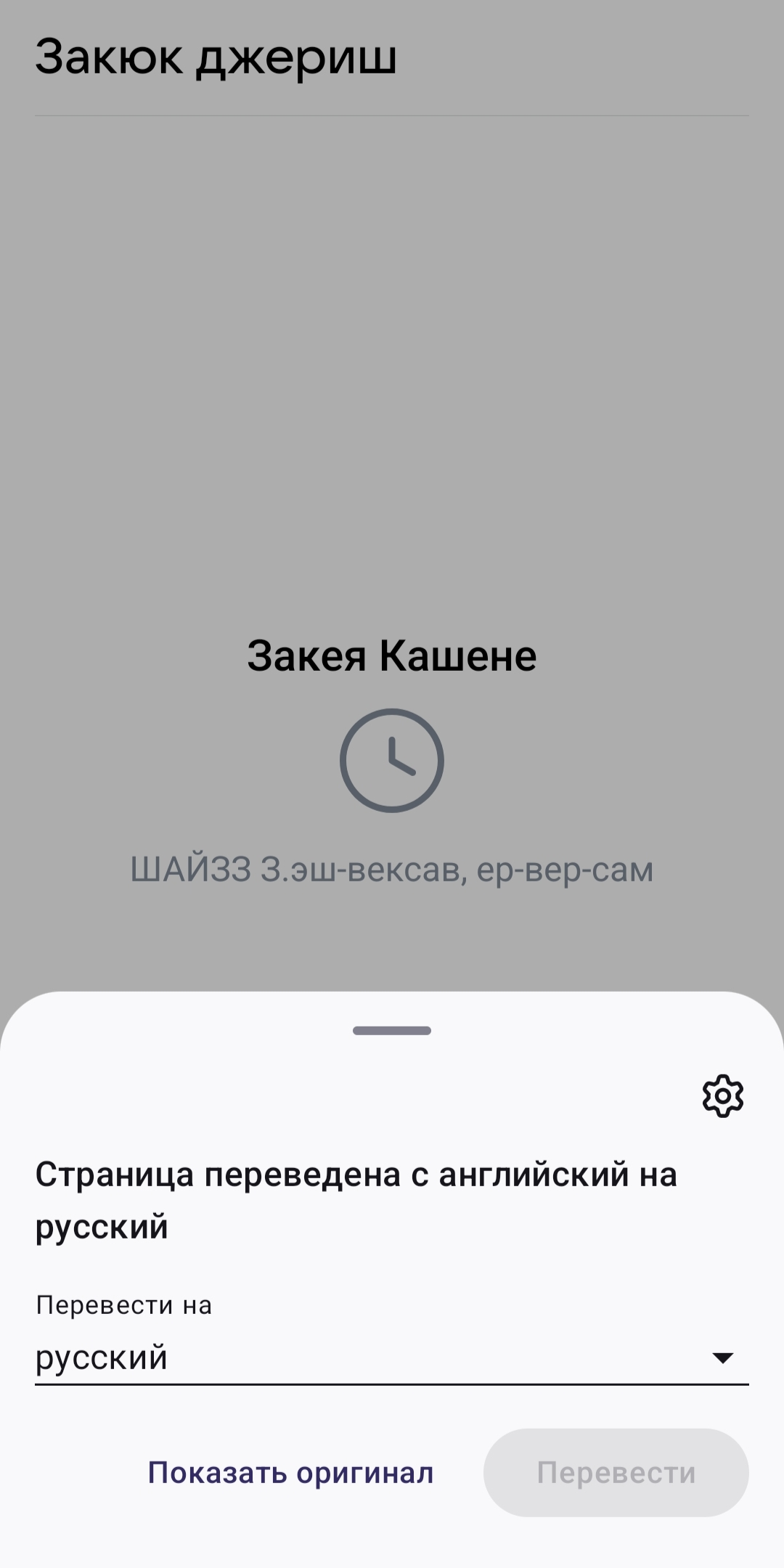
The browser recognizes Russian on the website as English and automatically translates it into "Russian," but what it actually produces is a jumble of letters that are neither Russian nor English. Essentially, the browser is translating from Russian—which I don't need to translate, since I'm from Russia—into an incomprehensible, non-existent language. And I can't turn off automatic translation of Russian because it's not available. There's a toggle switch: "Never translate English," but that doesn't work for Russian. You can click "Never translate this site" on the website itself, but the problem is that it's for a single website. It means I have to turn off translation and reload the website every time I visit a Russian-language website. This is very inconvenient. I ask you to add an option to disable translation of an entire language, not just English or a specific website.
すべての返信 (2)
Hi,
You can go to Settings > Translations > Automatic translation and adjust the settings there.
Does this happen to every website in Russian?
I went to Settings > Translations > Automatic Translation. All the languages are there, and yes, you can choose "always translate," "suggest translation," or "never translate" in any of them. The problem is, Russian isn't there, and I can't configure it. I also couldn't find Russian in the "Download languages" section. So, there's no way to disable automatic translation for Russian in the settings. So why do I need to send such a pointless answer? I looked through all the settings and couldn't find the setting I needed. Do you really think I'm that stupid that I can't figure out how to use automatic translation? I clearly identified the problem and explained it clearly. You still haven't answered the question: why does your browser recognize Russian on the website as English? It recognizes it as English and then automatically translates it into what appears to be Russian. So, the browser thinks it's translating an English website into Russian, but in fact, it's not. It translates Russian into Russian, if you can call it a translation. After such a translation from Russian to Russian, the entire text becomes an incoherent jumble of letters, a meaningless jumble of letters, a jumble of words that don't exist in Russian, let alone English. No matter how many times I've updated the browser through Google Play, the problem remains unresolved. What other advice would you give me, I wonder? Restart the phone? Clear the cache? Reinstall the browser? Change the device? I tried to be polite, but when someone who cared enough to find the technical support site, register, and describe the problem to help not only themselves but also you, and when such a person receives such a useless answer, the motivation to continue contacting technical support and reporting anything immediately vanishes. Hundreds of thousands and millions of other Russian users will download your browser, open a Russian site, be unable to use it, and simply delete it and switch to another one. It's unlikely that anyone will contact you about the problem or waste their time, at most in reviews on Google Play. They don't want to waste time on both a review and a problematic browser. I described it precisely enough to avoid any questions, and I indicated all possible options, but there's no way to set up this automatic translation. But it's as if you didn't even read what I wrote, sending me a reply: "Go to the 'Auto-translation' tab and set it up there." Brilliant.