how to change background color from black to white

how to change background color from black to white
how to change background color from black to white
すべての返信 (1)

Please clarify: you are trying to change the background color of what exactly?
If you are referring to websites:
1. Check your extensions list by clicking on the puzzle piece in the Firefox toolbar. Are you using "Dark Reader" or another extension that is setting dark mode? Toggle them off or remove them.
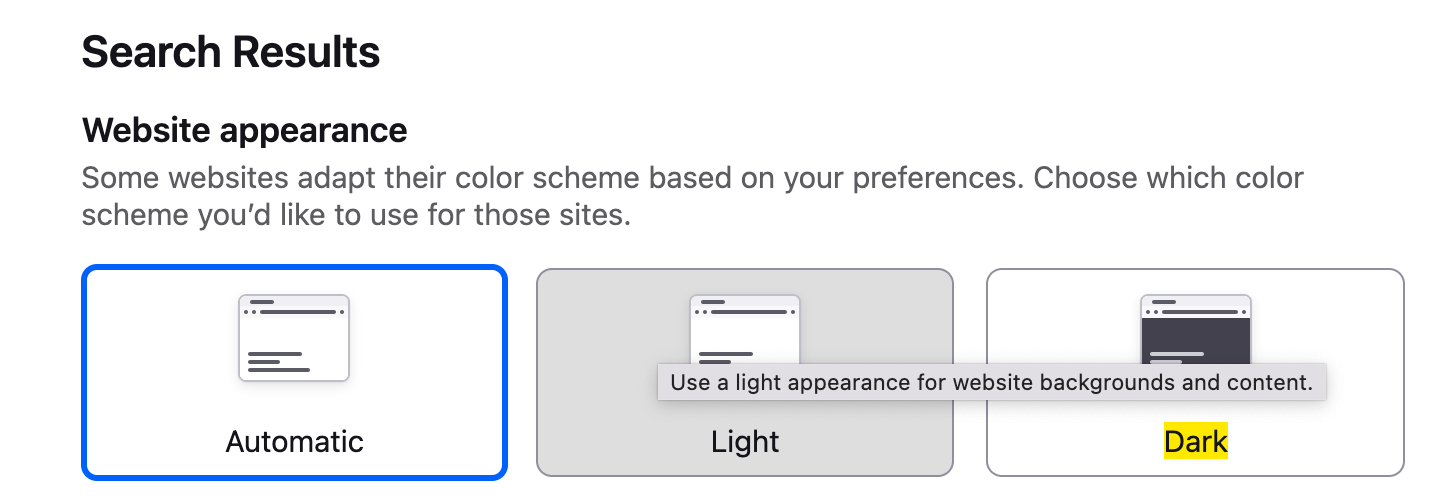
2. Go to Firefox settings -> type "light" in the settings search -> select Light (Screenshot).
If you are referring to blank tabs:
On a new tab, click on the pencil icon in the bottom right corner -> Wallpapers -> Solid colors -> Choose a color.
If none of these work, please provide the link of the website(s) where you have this issue.