


Duplicate emails after import

I added thunderbird to my phone , when I scanned qr code I have duplicates of all accounts. How do I delete the extras ?
選ばれた解決策
Hi Dougmet
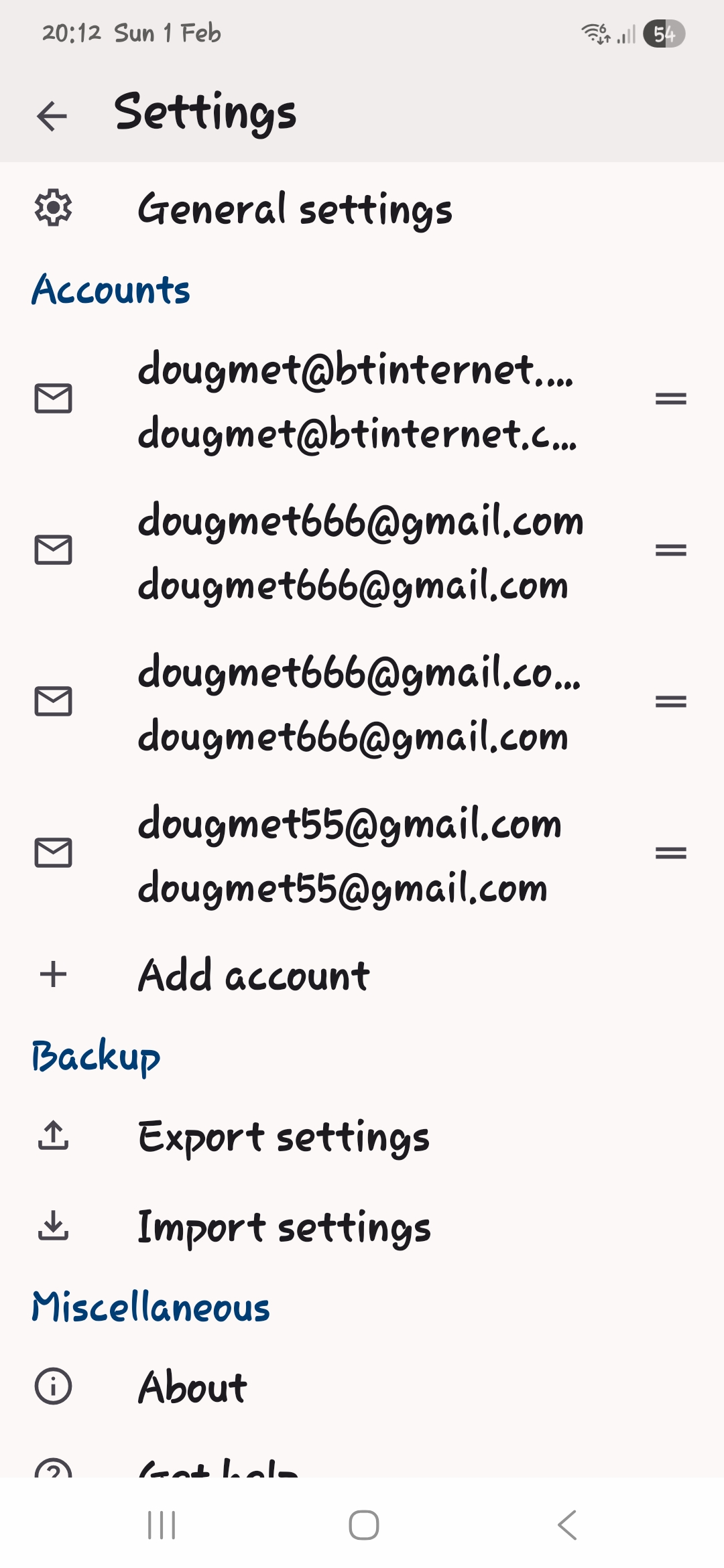
Your screen shot shows 4 accounts. Dougmet666 is possibly duplicated. The others are not.
Two text labels are displayed for each account. 1. A user definable account name. 2. The account's email address.
Having the account name and email address the same may be confusing.
To change the name of each account, navigate to: 1. Settings > account > general settings 2. Tap "Account name" 3. Type something new, e.g BTInternet, Gmail, Personal, Work etc
To delete an account, navigate to ... 1. Setting > account 2. Tap the 3 dot menu (top right of screen) 3. Tap remove account
この回答をすべて読む 👍 0すべての返信 (1)

選ばれた解決策
Hi Dougmet
Your screen shot shows 4 accounts. Dougmet666 is possibly duplicated. The others are not.
Two text labels are displayed for each account. 1. A user definable account name. 2. The account's email address.
Having the account name and email address the same may be confusing.
To change the name of each account, navigate to: 1. Settings > account > general settings 2. Tap "Account name" 3. Type something new, e.g BTInternet, Gmail, Personal, Work etc
To delete an account, navigate to ... 1. Setting > account 2. Tap the 3 dot menu (top right of screen) 3. Tap remove account