


Thunderbird message header pane

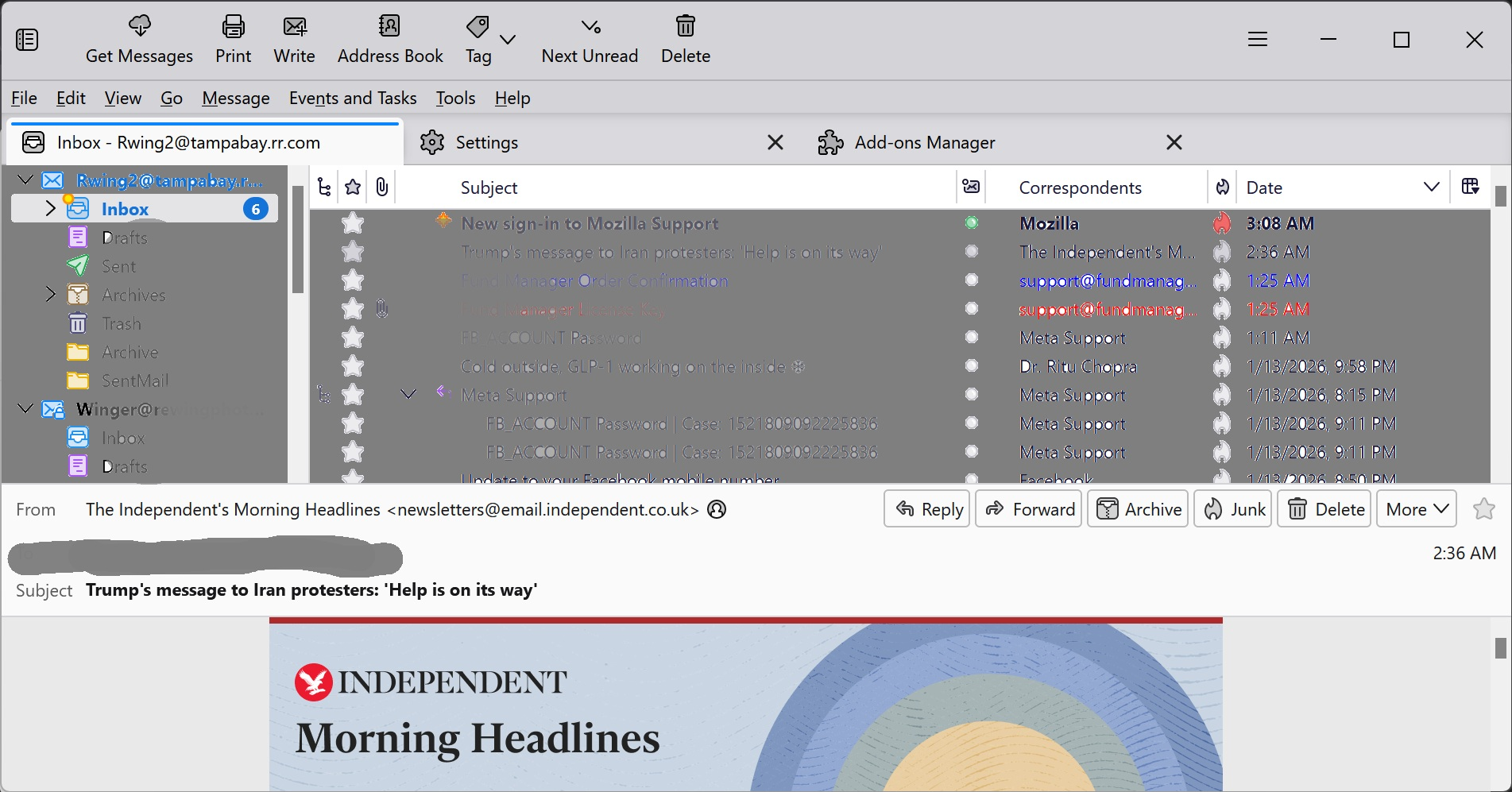
Thunderbird message header pane is so large that I can't read messages. The top 2/3rd of my screen has the list of messages, header bar, files, etc. The bottom 1/3 is for the actual email message, but the header takes up nearly half of that with just the "From", "To", and "Subject lines taking up more than half of that space. Depending on the text of the html message, sometimes I can only read one line at a time, which makes it difficult to actually comprehend a message while scrolling, particularly if it's a long message. I can't resize it to make it larger, though I can make it smaller. My eyesight isn't quite as good as it used to be so I use a larger font than I used to, ie: 12pt rather than 10pt, and that makes it worse. Any suggestions?
選ばれた解決策
Install the very useful add-on "Compact Headers". https://services.addons.thunderbird.net/az/thunderbird/addon/compact-headers/ Instead of "Wide" view I'm using Classic" view (image)
この回答をすべて読む 👍 1すべての返信 (3)
選ばれた解決策
Install the very useful add-on "Compact Headers". https://services.addons.thunderbird.net/az/thunderbird/addon/compact-headers/ Instead of "Wide" view I'm using Classic" view (image)


Thank you. The add-on did help. Now I can read it with the "wide" view, as well as the classic view.