"size on disk" and "user quota"

Please tell me what the difference is between "size on disk" and "user quota"? I don't understand why my mailbox is full when all folders take only 1/5 of the available space. My hosting give me 5GB, a user quota in mailbox is 4.7GB (in the app for computer: the main folder containing all other folders - properties folder - Quota - Storage: 4.7GB), size on disk is 853MB (in the app for computer: the main folder containing all other folders - properties folder - General Information - Size on disk: 853MB), and the weight of all folders is ~1040MB (the sum of the weights of all individual folders in the main folder). None of the numbers match. I understand that the sum of the weights of all folders is probably supposed to be 853MB, that the discrepancy is due to rounding the numbers. I understand that some space may be "lost" from the hosting because installation files take up some space, so I actually have 4.7GB to use, not 5GB. However, I don't understand why my mailbox is full, when from 4.7 GB only 853 MB is used?
選ばれた解決策
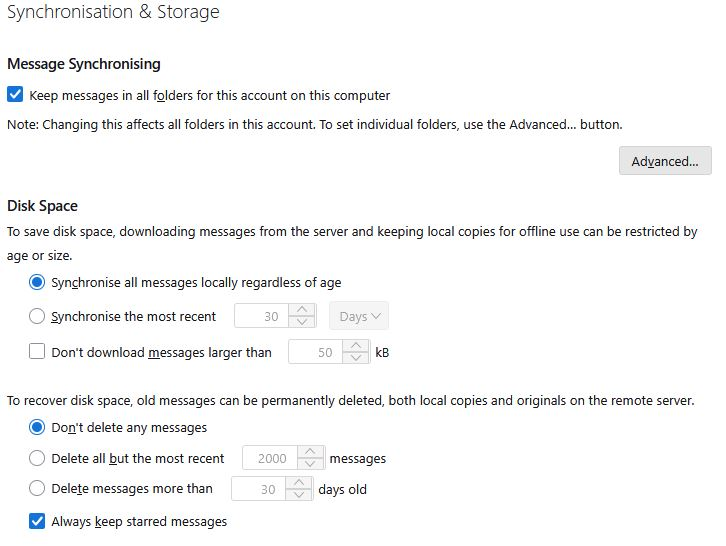
It's possible that you haven't downloaded all message bodies, just headers. Check Account Settings | Syncronization & Storage."
It sounds logical, but are you sure that these settings regulate that? I have the same settings as you have. Does this mean that the problem is not here?
この回答をすべて読む 👍 1すべての返信 (3)
Quota is not a Thunderbird term; it is a term from email provider. Thunderbird has no quota concept. I suggest pursuing the question with your email provider.

I believe what you see as "User Quota" is what is reported by the server. I don't think there's anything you can do about it.
It's possible that you haven't downloaded all message bodies, just headers. Check Account Settings | Syncronization & Storage. For example, this is how I have it set for my main account:
Message Synchronizing [x] Keep messages in all folders for this account on this computer
Disk Space [x] Synchronize all messages locally regardless of age
選ばれた解決策
It's possible that you haven't downloaded all message bodies, just headers. Check Account Settings | Syncronization & Storage."
It sounds logical, but are you sure that these settings regulate that? I have the same settings as you have. Does this mean that the problem is not here?