


Windows 10 reached EOS (end of support) on October 14, 2025. If you are on Windows 10, see this article.

Mozilla サポートの検索

サポート詐欺に注意してください。 私たちはあなたに通話やショートメッセージの送信、個人情報の共有を求めることはありません。疑わしい行為を見つけたら「迷惑行為を報告」からご報告ください。

詳しく学ぶ

このスレッドはアーカイブに保管されました。 必要であれば新たに質問してください。

Background Update (without someone opening FF first) does not work

  • 2 件の返信
  • 1 人がこの問題に困っています
  • 360 回表示
  • 最後の返信者: TheFlowingShepherd
  • アーカイブに保管済み

Hello!

Currently we deploy Firefox via SCCM Package on our machines. The problem is, that Firefox currently only updates itself when you opened it once. This leads to all sorts of Vulnerability warnings etc.

At the moment these regkey settings in HKLM\SOFTWARE\Policies\Mozilla\Firefox are configured: AppAutoUpdate (REG_DWORD) 0x00000001 (1) DisableAppUpdate (REG_DWORD) 0x00000000 (0)

These two are enough for the updates, when the user opened Firefox (and created a profile).

So we tried the information detailed on this page: https://firefox-source-docs.mozilla.org/toolkit/mozapps/update/docs/BackgroundUpdates.html

To achieve a 100% unattended update we added following Key: BackgroundAppUpdate (REG_DWORD) 0x00000001 (1) which yielded no results. Firefox stayed on his old Version (V131 for this example).

We also added pref("app.update.langpack.enabled", false) in the autoconfig.js File as kind of a 'hail mary' action (bc. the documentation wrote, that this setting should be disabled); but it still does not work.

We've been through this rabbit hole quite some times now, and researching it also yields inconclusive results. (answers like: you still need to start Firefox once, before it can update).

So, what are we missing/doing wrong? Is a true unattended Background Update even possible or is "start Firefox once to create a profile" still the only way to go?

Thanks in advance for your time & help
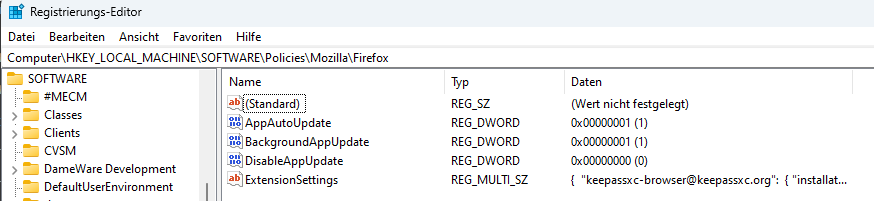
Hello! Currently we deploy Firefox via SCCM Package on our machines. The problem is, that Firefox currently only updates itself when you opened it once. This leads to all sorts of Vulnerability warnings etc. At the moment these regkey settings in HKLM\SOFTWARE\Policies\Mozilla\Firefox are configured: AppAutoUpdate (REG_DWORD) 0x00000001 (1) DisableAppUpdate (REG_DWORD) 0x00000000 (0) These two are enough for the updates, when the user opened Firefox (and created a profile). So we tried the information detailed on this page: https://firefox-source-docs.mozilla.org/toolkit/mozapps/update/docs/BackgroundUpdates.html To achieve a 100% unattended update we added following Key: BackgroundAppUpdate (REG_DWORD) 0x00000001 (1) which yielded no results. Firefox stayed on his old Version (V131 for this example). We also added pref("app.update.langpack.enabled", false) in the autoconfig.js File as kind of a 'hail mary' action (bc. the documentation wrote, that this setting should be disabled); but it still does not work. We've been through this rabbit hole quite some times now, and researching it also yields inconclusive results. (answers like: you still need to start Firefox once, before it can update). So, what are we missing/doing wrong? Is a true unattended Background Update even possible or is "start Firefox once to create a profile" still the only way to go? Thanks in advance for your time & help
添付されたスクリーンショット

すべての返信 (2)

The Firefox background updater requires that a profile has been created, so it doesn't work unless Firefox has been opened once.

Is there any way to update Firefox without opening it once? (Beside Deployment via Intune or SCCM)?