


Windows 10 reached EOS (end of support) on October 14, 2025. If you are on Windows 10, see this article.

Mozilla サポートの検索

サポート詐欺に注意してください。 私たちはあなたに通話やショートメッセージの送信、個人情報の共有を求めることはありません。疑わしい行為を見つけたら「迷惑行為を報告」からご報告ください。

詳しく学ぶ
このスレッドはアーカイブに保管されました。 必要であれば新たに質問してください。
Solved アーカイブに保管済み

Multiple inboxes not displaying on "Unified Folders" - showing on "All Folders"

archlab-services

I have just set up Thunderbird with a handful of email accounts.

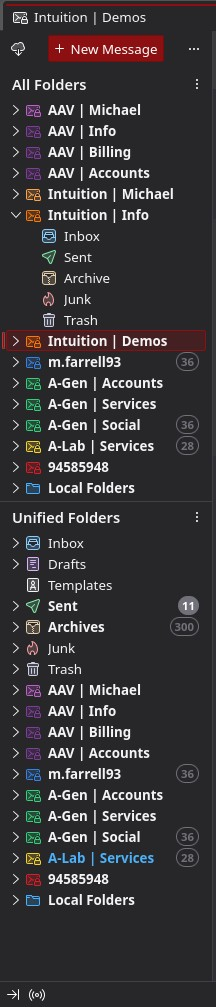
All inboxes show in the "All Folders" panel block, but when "Unified Folders" block is selected, the accounts prefixed "Intuition" fail to show in the panel. The Unified Inbox DOES receive mail from these hidden accounts, but this isn't really good enough as I need to be able to browse in to the folders within these accounts regularly.

Having both Unified and All views up is a workaround, but with 10+ accounts it takes up the full length of the screen when collapsed and is not the ideal setup.

I have deleted the folder index json and a couple of other internet-sourced tricks but to no avail.

Image attached - accounts prefixed "intuition" are the culprits!

I have just set up Thunderbird with a handful of email accounts. All inboxes show in the "All Folders" panel block, but when "Unified Folders" block is selected, the accounts prefixed "Intuition" fail to show in the panel. The Unified Inbox DOES receive mail from these hidden accounts, but this isn't really good enough as I need to be able to browse in to the folders within these accounts regularly. Having both Unified and All views up is a workaround, but with 10+ accounts it takes up the full length of the screen when collapsed and is not the ideal setup. I have deleted the folder index json and a couple of other internet-sourced tricks but to no avail. Image attached - accounts prefixed "intuition" are the culprits!

すべての返信 (2)

Image attached here
選ばれた解決策

If the Intuition accounts have only standard server folders (inbox, sent, drafts, trash, junk), then there is nothing to show outside the unified inbox, sent, etc. folders.