


Windows 10 reached EOS (end of support) on October 14, 2025. If you are on Windows 10, see this article.

Mozilla サポートの検索

サポート詐欺に注意してください。 私たちはあなたに通話やショートメッセージの送信、個人情報の共有を求めることはありません。疑わしい行為を見つけたら「迷惑行為を報告」からご報告ください。

詳しく学ぶ

このスレッドはアーカイブに保管されました。 必要であれば新たに質問してください。

IMAP Sync Clarification

  • 2 件の返信
  • 0 人がこの問題に困っています
  • 144 回表示
  • 最後の返信者: skdajnfgsdgew
  • アーカイブに保管済み

Mozilla's documentation on IMAP Synchronization Mozilla's documentation on IMAP Synchronization indicates

"Non-synchronized messages are still accessible within Thunderbird. The only difference is that rather than downloading the entire message, only the message "headers" are downloaded. (Message headers contain information like the sender, recipient(s), subject, etc - everything except the body of the message.) The message body is not downloaded until you click on the message in the message list"

Under what settings (e.g. Sync messages checked or unchecked) does this behavior apply?

Thanks.

[https://support.mozilla.org/en-US/kb/imap-synchronization Mozilla's documentation on IMAP Synchronization] Mozilla's documentation on IMAP Synchronization indicates "Non-synchronized messages are still accessible within Thunderbird. The only difference is that rather than downloading the entire message, only the message "headers" are downloaded. (Message headers contain information like the sender, recipient(s), subject, etc - everything except the body of the message.) The message body is not downloaded until you click on the message in the message list" Under what settings (e.g. Sync messages checked or unchecked) does this behavior apply? Thanks.

すべての返信 (2)

In account settings
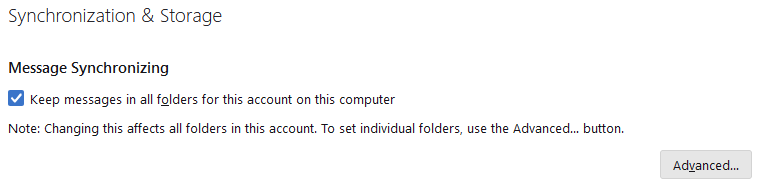
Thanks. RE: "Non-synchronized messages are still accessible..." So there are still non-synchronized messages, when that option is enabled?

Seems like the actual message state of synchronized/not-synchronized is decoupled from the setting.