


Imported email folder merge

I used ImportExportTools NG to export messages from one profile and import to another.
I tried to export only selected messages from my one of my local folders (it seemed an option, but IET NG is not intuitive).
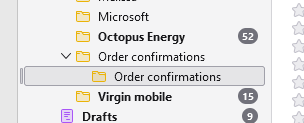
Whatever, the import process has created a sub-folder in the local folder of the same name, and there is a huge redundancy (duplication) resulting.
My question: how can I merge the sub-folder into the parent, when dragging and dropping is not allowed?
選ばれた解決策
Drag the messages, not the folder.
この回答をすべて読む 👍 0すべての返信 (3)
Why is drag and drop not allowed? It works for me.
Googles AI tells me this about removing duplicates.
To remove duplicate emails in Thunderbird, you can use the "Remove Duplicate Messages" add-on. This add-on allows you to scan folders for duplicates and delete them. You can find and install it from the Thunderbird add-ons manager. Here's how to use the add-on: Open Thunderbird and go to the Add-ons manager. This can be found under the Tools menu. Search for "Remove Duplicate Messages" and install it. Restart Thunderbird. Right-click on the folder you want to check. Select "Remove Duplicate Messages". Follow the on-screen instructions to delete the duplicates. Additionally, you can configure the add-on by going to Tools > Add-on Options > Remove Duplicate Messages. This allows you to choose which characteristics to compare (like message ID, send time, subject, etc.) and choose whether to keep the first or last occurrence of a duplicate.
Looking at the addon mentioned it works with V128-139 (the current supported releases) so it sounds like good advice to me.
The "Remove Duplicate Messages" add-on looks very useful - thanks for that.
You say 'drag and drop works for me' but I suppose it depends on what you want to drag and drop! In my case, dragging the sub-folder over its parent (hoping to merge) produces a red 'no-go' sign. I can't show it in the snip because it only appears with a held left click.
Were you referring to that process? Maybe merging is just not possible in TB?
I stick to esr releases, currently 128.11.1esr(64-bit).

選ばれた解決策
Drag the messages, not the folder.