


New incoming emails are no longer marked as "unread" and In bold print when they arrive. I have to manually mark them as unread.

New incoming emails are no longer marked as "unread" and In bold print when they arrive. I have to manually mark them as unread. Then when I read them, they do not consistently change to "read". This was not a problem until I started using the 128.10.0esr (64-bit) version of Thunderbird.
この投稿は Wayne Mery により に変更されました
すべての返信 (6)

Gene Maas said
Then when I read them, they do not consistently change to "read".
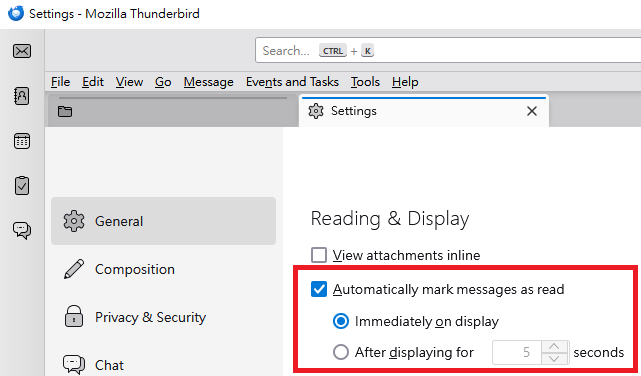
Please examine the following settings: "Settings" > "General" > "Reading & Display" > "Automatically mark message as read".
Please see the attached image.

Do you access your mail anywhere other than Thunderbird on one computer?
Do you use any message filters?
I do NOT want my messages to be automatically marked as read. I Would like new messages to be in bold print and marked as unread. After I read them, they should change to read
I do not access your mail anywhere other than Thunderbird on one computer. I do not use any message filters.
Yu5tiqX9og suggested that you examine a setting because you may have accidentally set all incoming messages to be marked as read. Would you please check that setting?
Gene Maas said
I do not access your mail anywhere other than Thunderbird on one computer. I do not use any message filters.
You access my mail?! Yikes!
Sorry, I cut and pasted, but failed to change "your" to "my".