


No audio available

I have searched Support, enabled media Autoplay for all sites, Page Info for individual sites. Videos play but never with audio. Currently using FF 134.0 (64-bit) on Debian 12, but recall some problems starting about the 133.0 update. No audio with Youtube, Amazon testimonials/reviews, etc.
Please help?
選ばれた解決策
Rusy, some possibilities to consider.
1. Is the tab muted? If you right-click on the tab header at the top of the screen, is there an "Unmute Tab" option?
2. What happens if you press the mute / unmute button within a video player?
3. Could Firefox be muted in your OS volume settings? I know that in Windows you can mute individual applications within the Windows settings, so wonder if this has happened in your OS?
この回答をすべて読む 👍 0すべての返信 (3)

選ばれた解決策
Rusy, some possibilities to consider.
1. Is the tab muted? If you right-click on the tab header at the top of the screen, is there an "Unmute Tab" option?
2. What happens if you press the mute / unmute button within a video player?
3. Could Firefox be muted in your OS volume settings? I know that in Windows you can mute individual applications within the Windows settings, so wonder if this has happened in your OS?
TechHorse, thank you so much for your suggestion and your patience with my followup. The lowest entry in the attached user "System Settings" was muted for unknown reason(s).
In FF, how would one discover what audio-stream tool is being used? What should one search for in "Settings"?
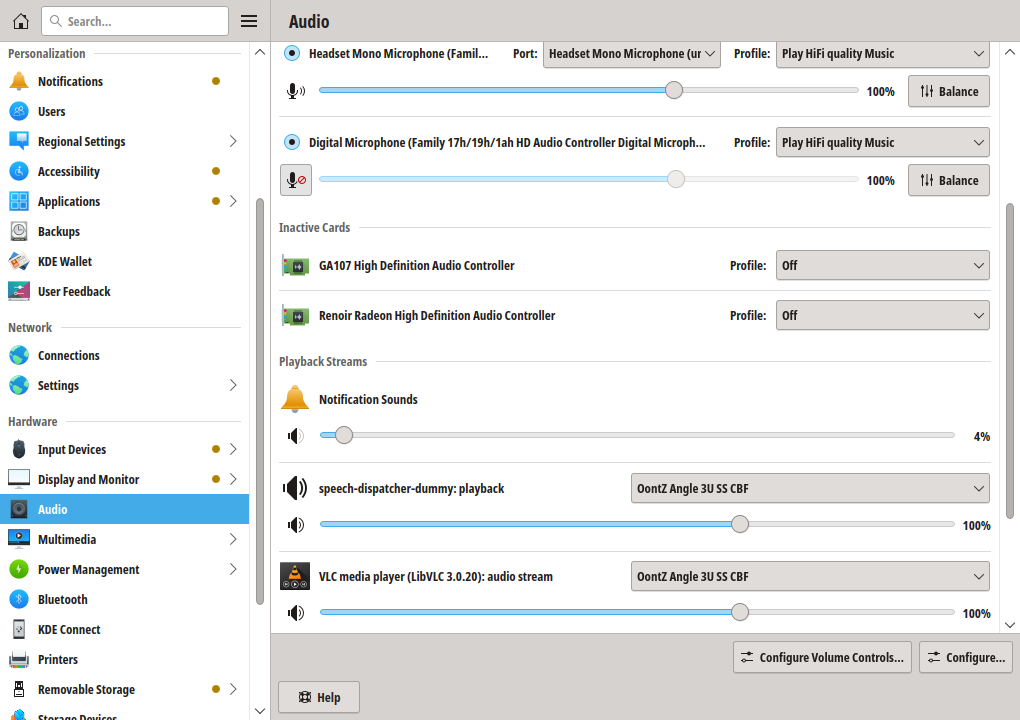
Rusy, glad you found a solution for the lack of audio. Sorry can't help with the sound devices question, but if you wished, you could ask a new question and perhaps someone else can help.