


Thunderbird doesn't show # of messages in SPAM Folder
NO flltering system is perfect, so a real live human bean needs to check what Gmail and/or Thunderbird has classified as Spam and retrieve the few valid messages. But unless Thunderbird displays NUMBER of messages waiting there, I'm not reminded to check. Is there some parameter I need to set to make it do that?
Thanks for help.
すべての返信 (4)
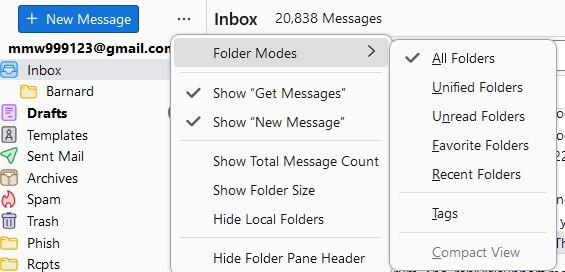
If using release 128, there are three dots to the right of the 'new message' icon. Clicking that will show an option to display totals.
Thanks for the helpful response. Once I knew to click on the three dots, with a little trial and error, I figured out that turning on "Total Message Count", it would show the total messages. Since my practice when looking at Spam messages is to either delete them or move them to a valid folder, a count other than zero will indicate there's something I ought to look at. I've attached some before and after screen shots in case that might help anybody else with the same problem.
But I don't understand why the Spam folder can't behave the way I THINK the other folders behave even when "Total Message Count" is off. That is they show the total # of UNREAD messages. Only with the Spam folder, you must click on it to get the total # of unread messages to appear. The Catch-22 is that without that memory jogger, I don't always remember to click on it, and didn't get a message about an appointment today until too late.
But hopefully now, because of your help, I won't miss any more important messages that are mouldering in the Spam folder. So thanks a bunch!!

Right click the folder, select properties and then select "when getting new messages for this account, always check this folder."
Thunderbird does not by default check the trash or the spam folders when getting new mail, only when you select the folder. So, yes it does not work like the other folders, or like you expect it to work. unless you change the defaults to make it act like other folders.
Thanks for the very helpful info. I guess there's a reason that all the parameters for Thunderbird (and practically every other program I used) are scattered here, there and everywhere, you can't set (and keep) the behaviours you want. (Windows does a masterful job of reorganizing the Control Panel every 15 minutes to make it as difficult as possible to override their nitwit defaults. [g])
And actually there was a piece of serendipity from your advice. Every so often, when Thunderbird compresses folders, it garbles messages (e.g. the wrong recipient will be attached to a message). I had been about to post a query asking whether anybody was aware of this and/or had suggestions for what to do about it. But when I right clicked to follow your advice, I discovered the repair function and after I ran it, the message in which I notice the error had the correct recipient again.
So double-thanks for your help.