


Problem Importing addresses from a CSV

I have a CSV file from Outlook with addresses I want to import into Thunderbird.
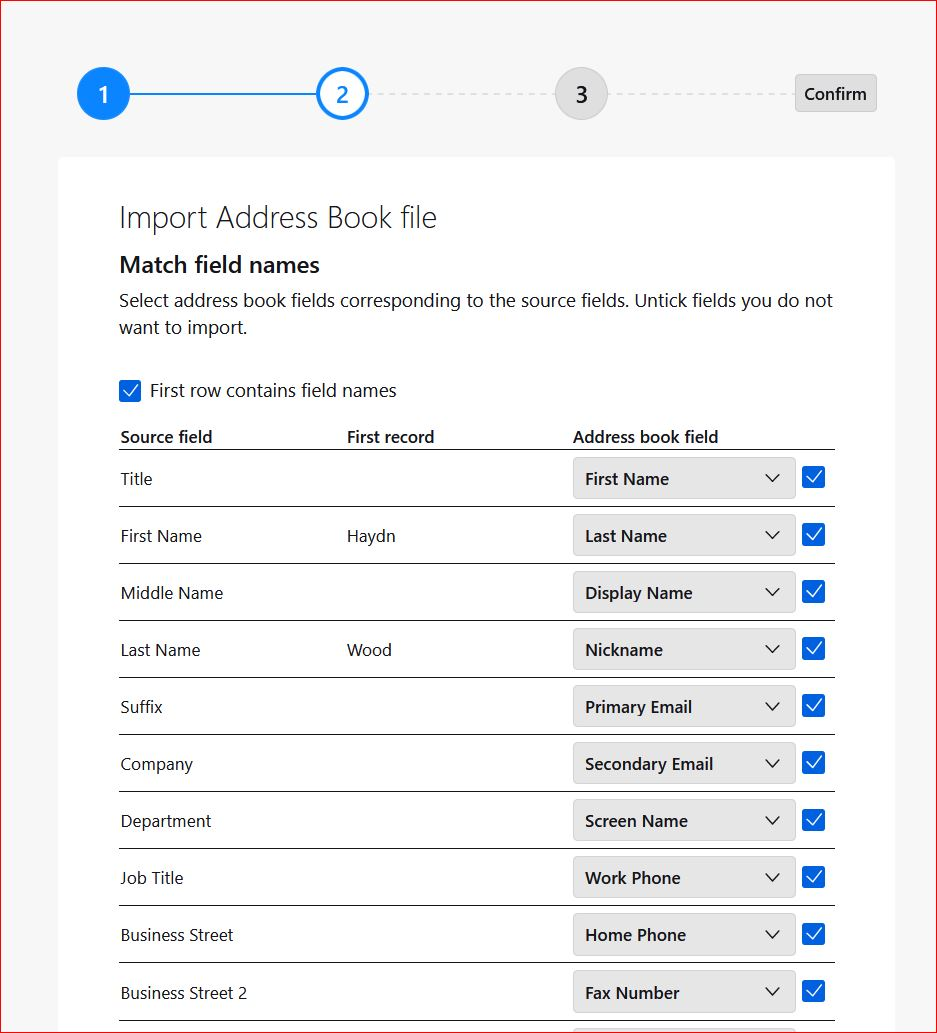
In an older version of Thunderbird I was able to match the fields in the CSV to the fields in the Thunderbird address book but in the latest version this seems to be missing - I was able to move the fields up/down to match before importing but this doesn't seem to be available (see attached screen shot). The import screen looks different with no way of moving fields up/down to match.
The drop down arrows on the fields on the right (the Thunderbird address fields) only show one field so I am not able to match them.
How do I match the fields to the CSV file so I can import my addresses/contacts.
Thanks
すべての返信 (1)
i have had success this way: - place at least one address manually in addressbook - then export it as csv - use the exported csv as a model for your outlook csv. I do this in a spreadsheet to align the columns and top row to match - once down, save as csv and it should import properly.