


How to Get rid of "Firefox closed unexpectedly while starting" error window

Unattended software (kiosk) here.
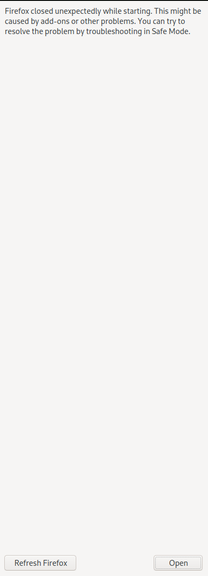
Sometimes (so rarely that I cannot reproduce in dev) the client sees this error screen: "Firefox closed unexpectedly while starting..." (see image in attachment)
Sometimes when rebooting the error goes away and Firefox starts normally.
Sometimes even when rebooting the system - this vertical error screen appears, and one solution is to reinstall Firefox, but I'd like not to (if not necessary) or at least programmatically detect the issue and perform the needed actions.
QUESTIONS: How to programmatically detect (bash i.e.) that this error window is present and get rid of it properly? Or, how to (for debugging) force that screen to appear (to force that broken state)?
PS: I'm running Firefox using:
nohup firefox -P ff_custom_profile -new-instance -private-window -kiosk "$url" > /dev/null 2>&1 &
Thank you for any assistance or insight
すべての返信 (2)
Quick fix: this added bash line seems to help when the monitor script (cron jobbed) detects that firefox is not running and tries to restart it:
Try to kill any running firefox or mozilla crash reporters, then do:
rm -f ~/.mozilla/firefox/*.default/{.parentlock,lock}
and then start again Firefox (with custom profile).
この投稿は Roko C.B. により に変更されました

I would open a bugzilla bug for this so that someone could help you track down why Firefox is crashing at startup