Print an external page without opening it not working in Firefox

I'm trying to print a PDF document without opening it. I found a [guide][1] on MDN that explains how this can be done.
```jsx
 const handleClick = (
   event: React.MouseEvent<HTMLButtonElement, MouseEvent>,
 ) => {
   event.stopPropagation();
   event.preventDefault();
const frame = document.createElement('iframe');
   frame.onload = () => {
     frame.contentWindow.print();
   };
   // frame.style.display = 'none';
   frame.src = docflow.primaryDocumentPdfUrl;
   document.body.appendChild(frame);
 };
```
In Chrome everything works well, but in Firefox an error occurs (see below).
> Partitioned cookie or storage access was provided to > “http://localhost:3000/api/documents/5bf1c493-b8ce-4f82-9ee0-def28065c645/visualization” > because it is loaded in the third-party context and dynamic state > partitioning is enabled
[![Error][2]][2]
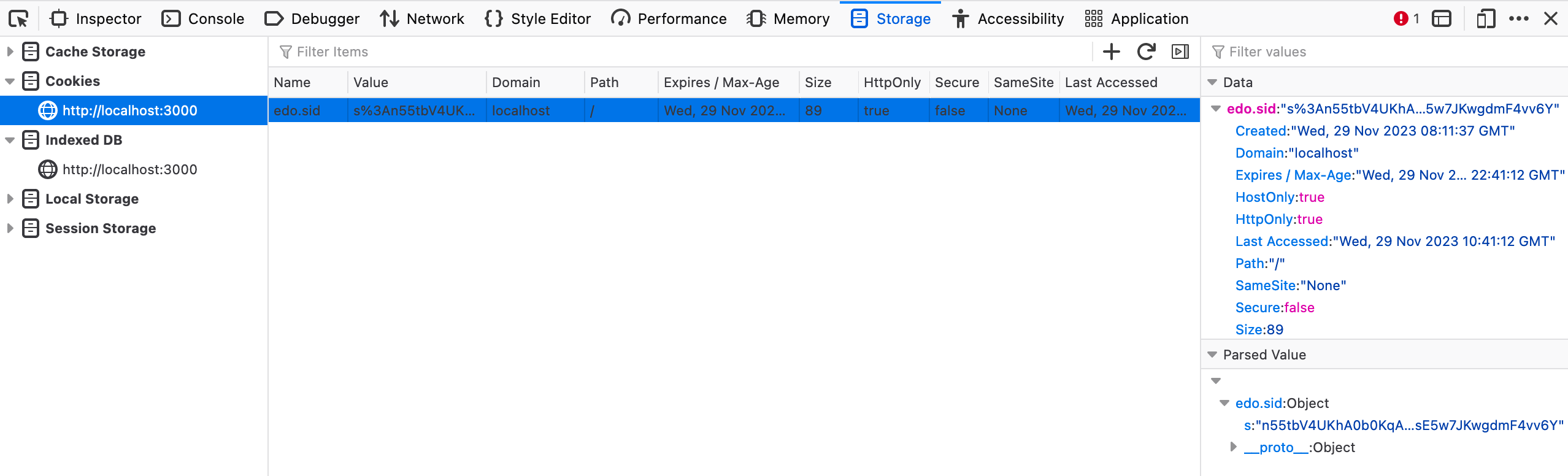
Storage tab screenshot:
[![Storage][3]][3]
What am I doing wrong?
 [1]: https://developer.mozilla.org/en-US/docs/Web/Guide/Printing#print_an_external_page_without_opening_it
 [2]: https://i.stack.imgur.com/SwkRq.png
 [3]: https://i.stack.imgur.com/JZYXM.png


I'm trying to print a PDF document without opening it. I found a [guide][1] on MDN that explains how this can be done.
```jsx
const handleClick = (
event: React.MouseEvent<HTMLButtonElement, MouseEvent>,
) => {
event.stopPropagation();
event.preventDefault();
const frame = document.createElement('iframe');
frame.onload = () => {
frame.contentWindow.print();
};
// frame.style.display = 'none';
frame.src = docflow.primaryDocumentPdfUrl;
document.body.appendChild(frame);
};
```
In Chrome everything works well, but in Firefox an error occurs (see below).
> Partitioned cookie or storage access was provided to
> “http://localhost:3000/api/documents/5bf1c493-b8ce-4f82-9ee0-def28065c645/visualization”
> because it is loaded in the third-party context and dynamic state
> partitioning is enabled
[![Error][2]][2]
Storage tab screenshot:
[![Storage][3]][3]
What am I doing wrong?
[1]: https://developer.mozilla.org/en-US/docs/Web/Guide/Printing#print_an_external_page_without_opening_it
[2]: https://i.stack.imgur.com/SwkRq.png
[3]: https://i.stack.imgur.com/JZYXM.png