

このスレッドはアーカイブに保管されました。
必要であれば新たに質問してください。

Solved
アーカイブに保管済み
Login to server outlook.office365.com with username xxxxxxxxxxxxx failed

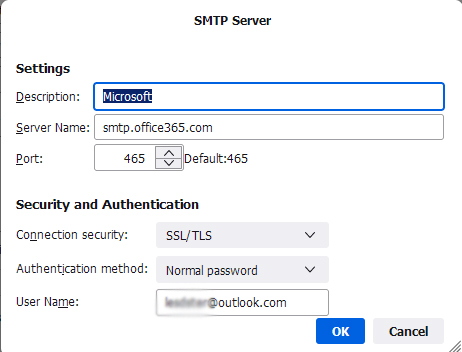
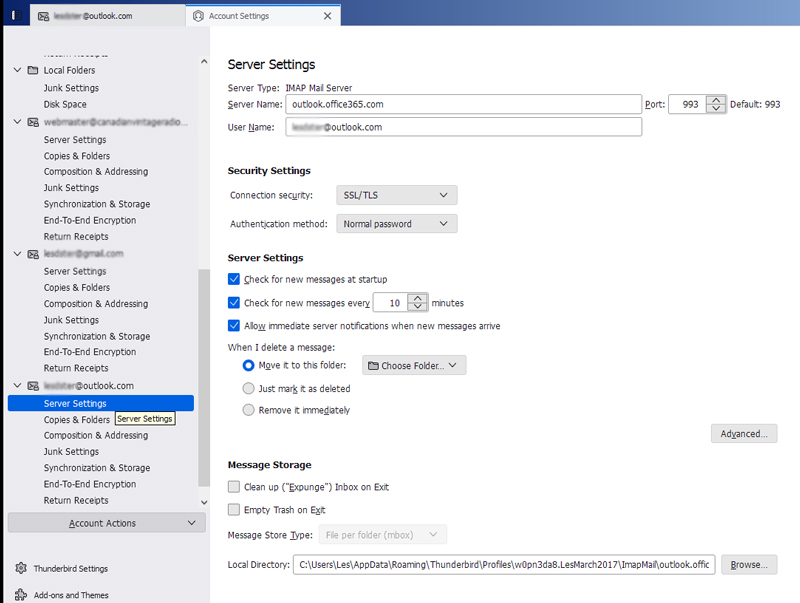
Recently (~January 25, 2023) in Thunderbird (102.7.0) my outlook.com email (SMTP) stopped working with the error message, "Login to server outlook.office365.com with username xxxxxxxxxx failed."
- I see some have suggested changing Authentication method to "OAuth" from "Normal Password" but this has not helped. (Not sure if OAuth is different than OAuth2, but only OAuth2 is an option in Thunderbird)
- I have tried setting the Authentication to OAuth2 in the outlook.com account => account settings => Edit SMTP server
- I have tried setting the Authentication to OAuth2 in the outlook.com account => Server Settings
- In the outlook.com account => Server Settings - Connection security is set to SSL/TLS; Port is 993
- In the outlook.com account => account settings => Edit SMTP server Connection security is set to SSL/TLS; Port is 465
Recently (~January 25, 2023) in Thunderbird (102.7.0) my outlook.com email (SMTP) stopped working with the error message, "Login to server outlook.office365.com with username xxxxxxxxxx failed."
* I see some have suggested changing Authentication method to "OAuth" from "Normal Password" but this has not helped. (Not sure if OAuth is different than OAuth2, but only OAuth2 is an option in Thunderbird)
* I have tried setting the Authentication to OAuth2 in the outlook.com account => account settings => Edit SMTP server
* I have tried setting the Authentication to OAuth2 in the outlook.com account => Server Settings
* In the outlook.com account => Server Settings - Connection security is set to SSL/TLS; Port is 993
* In the outlook.com account => account settings => Edit SMTP server Connection security is set to SSL/TLS; Port is 465
すべての返信 (1)
選ばれた解決策
The correct settings are: outlook.office365.com on 993, SSL/TLS, normal password, User Name = email address; smtp.office365.com on 587, STARTTLS, normal password, User Name = email address.
If it doesn't work with the correct settings, check if two-step verification is on the account (if so, use an app password), disable a VPN if applicable, and disable antivirus scanning of the TB profile folder (e.g. Mail Shield) and scanning of secure (SSL) connections.