


Windows 10 reached EOS (end of support) on October 14, 2025. If you are on Windows 10, see this article.

Mozilla サポートの検索

サポート詐欺に注意してください。 私たちはあなたに通話やショートメッセージの送信、個人情報の共有を求めることはありません。疑わしい行為を見つけたら「迷惑行為を報告」からご報告ください。

詳しく学ぶ

このスレッドはアーカイブに保管されました。 必要であれば新たに質問してください。

Opening attachments from inbox

  • 2 件の返信
  • 1 人がこの問題に困っています
  • 140 回表示
  • 最後の返信者: Jan Starka
  • アーカイブに保管済み

Hello,

when I click on an e-mail attachment, a windows always pops-up that asks me what to do. I have "Do this automatically for files like this from now on" checked but the pop-up appears every time. If I select "Save file" than next time the dialog window for saving pops-up automatically. Only PDF files are opened without asking. The error started immediatelly after updating to Thunderbird 91.

In compose message window a double click on the attached file works fine.

I tried to delete the associations in preference and create them new but with the same result. As I open a lot of attachments, this bug is really annoying me. How can I resolve it?
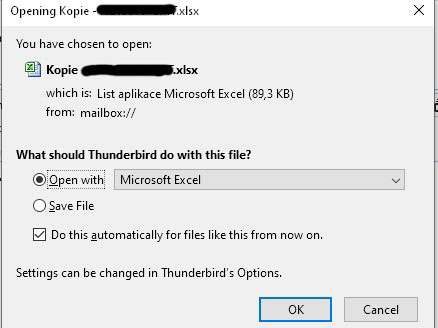
Hello, when I click on an e-mail attachment, a windows always pops-up that asks me what to do. I have "Do this automatically for files like this from now on" checked but the pop-up appears every time. If I select "Save file" than next time the dialog window for saving pops-up automatically. Only PDF files are opened without asking. The error started immediatelly after updating to Thunderbird 91. In compose message window a double click on the attached file works fine. I tried to delete the associations in preference and create them new but with the same result. As I open a lot of attachments, this bug is really annoying me. How can I resolve it?
添付されたスクリーンショット

すべての返信 (2)

Thank you, I could not find the previous posts. I will see if the problem will be corrected with the next update, otherwise I will either revert to an older version or try Betterbird