


How do I add a CalDav link for Tasks in Thunderbird?
Hi folks,
I have a Synology CalDav server setup for Calendar and Tasks. I was able to get the Calendar working, but the Tasks Lists I created did not come with it. Is there another way that I should be getting Thunderbird, to see tasks on a CalDav server? My working link for the Calendar looks like this: https://xxx.synology.me:60064/caldav/xxx/home/
すべての返信 (4)
Never mind, turns out I just needed to change the address from https://xxx.synology.me:60064/caldav/xxx/home/ to https://xxx.synology.me:60064/caldav/xxx/
Problem Solved. :)
@DadofRCA,
I also use a Synology NAS to host my own calendar/tasks. On my Thunderbird, I use the extensions "Provider for CalDAV & CardDAV" and "TbSync" to get my Synology Calendar and Tasks to show up. This has worked well for me on Thunderbird version 68.
However, I am having an issue getting the Tasks to show up on the calendar on Thunderbird version 78. The issue is my Tasks that have a specified due date do not show up on the calendar. See the attached photo. The Tasks that do NOT have a specified due date do indeed show up on the side bar menu (not shown in the attached photo).
Both versions of TB are set up the exact same locations: - Calendars: https://[local_ip_address]:[port]/caldav.php/xxx/home/ - Tasks: https://[local_ip_address]:[port]/caldav.php/xxx/home_todo/
I would like to use the latest version of TB, but I really would like my Tasks visible on the calendar. Does anyone else have this issue or have any suggestions?
I would greatly appreciate your help!
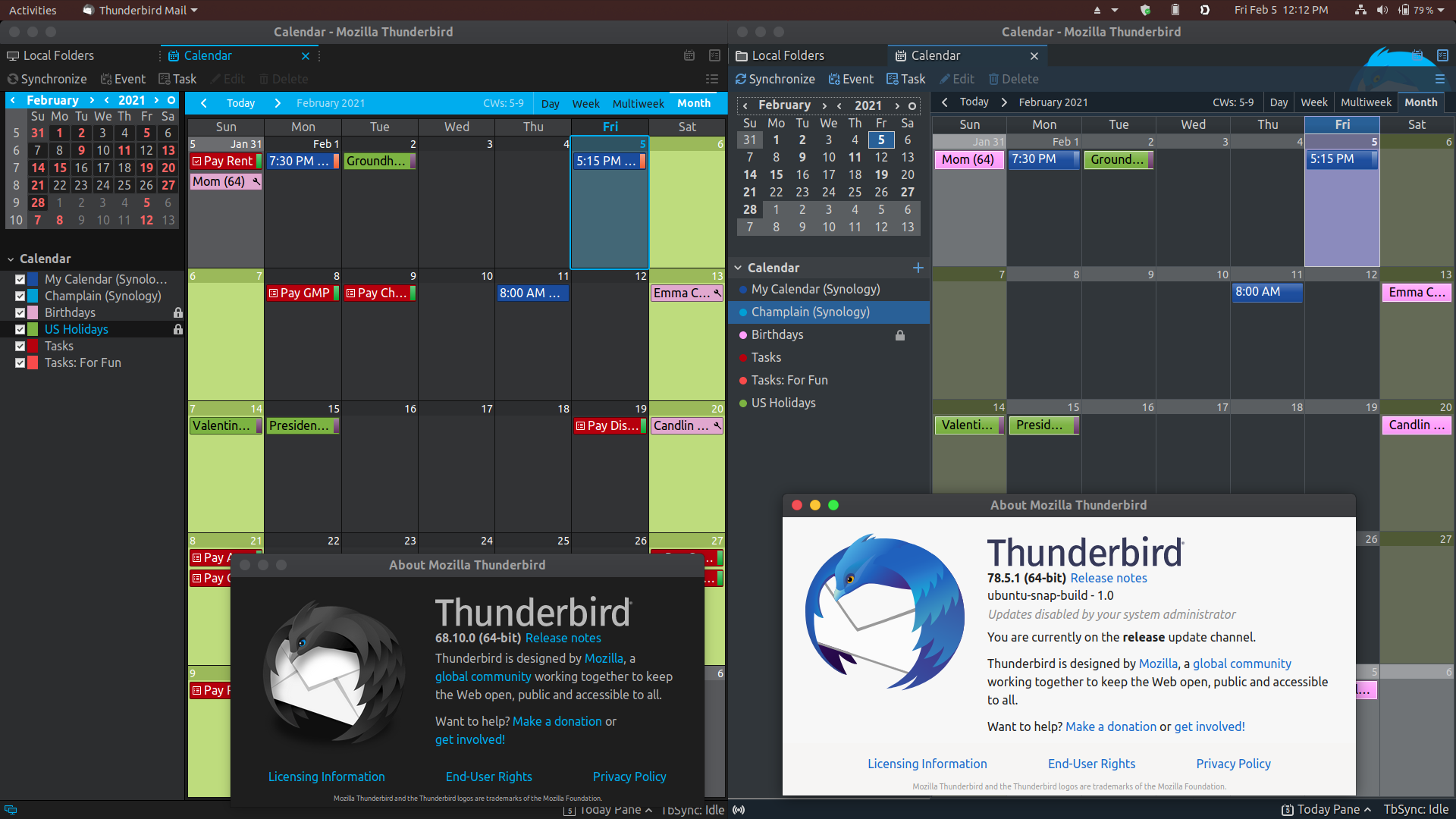
mamoswrath said
@DadofRCA, I also use a Synology NAS to host my own calendar/tasks. On my Thunderbird, I use the extensions "Provider for CalDAV & CardDAV" and "TbSync" to get my Synology Calendar and Tasks to show up. This has worked well for me on Thunderbird version 68. However, I am having an issue getting the Tasks to show up on the calendar on Thunderbird version 78. The issue is my Tasks that have a specified due date do not show up on the calendar. See the attached photo. The Tasks that do NOT have a specified due date do indeed show up on the side bar menu (not shown in the attached photo). Both versions of TB are set up the exact same locations: - Calendars: https://[local_ip_address]:[port]/caldav.php/xxx/home/ - Tasks: https://[local_ip_address]:[port]/caldav.php/xxx/home_todo/ I would like to use the latest version of TB, but I really would like my Tasks visible on the calendar. Does anyone else have this issue or have any suggestions? I would greatly appreciate your help!
This worked for me: View > Calendar > Current View > Tasks in View
Thank you so much @DadofRCA! I am elated to have this working. Much appreciated!