


Automatyczne potwierdzenie otrzymania wiadomości.
Witam, poszukuję rozwiązania do Thunderbird, dzięki któremu po otrzymaniu maila z konkretnego adresu mailowego, automatycznie wyśle się do nadawcy mail ze spersonalizowanym tytułem wiadomości, np: Dziękuję. <tytuł pierwotnej wiadomości>.
Będę wdzięczny za pomoc. Pozdrawiam, PK
すべての返信 (3)
Automatic acknowledgment of receipt of the message
pkaluza said
Hello, I am looking for a solution for Thunderbird, thanks to which after receiving an email from a specific email address, I will automatically send the sender an email with a personalized title of the message, e.g. Thank you. <title of original message>. I will be grateful for your help. Regards, PK
Create a template for the account, then make a filter that looks like the attached picture. The rule can apply to a specific From: (sender) or senders that are in an address book, e.g. testing. If you set up this kind of autoreply on the mail provider's site, it will operate even when TB is not running.
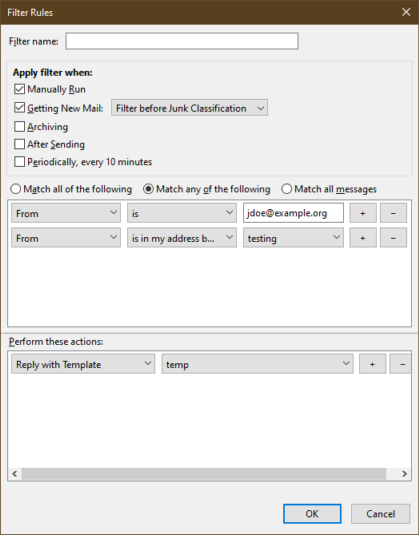
Hi sfhowes, thnak You so much - it works brilliant!! But i have only one problem with this solution. 1. i create a template with title: "Thank You" 2. set the filter 3. receive automatic answer (works great), but with this title: "Auto: Thank You (was: <title of original message>) 4. All i need now, is to send my automatic answer with this title: "Thank You <title of original message>"
Do YOu think, is there any chance to format my title without this Auto: and Was: ?
Thank You in advance, Pawel
I don't think you can format the Subject in the autoreply with the built-in options, but you may be able to with the SmartTemplate4 add-on. That might be more trouble than it's worth.