Spell check always on, even after turning off at Tools>Options>Composition>Spelling
When composing a TB message, word suggestions constantly appear, even when my spelling is correct. I do NOT want this, as I am adequately familiar with the spelling of the language I use.
When composing, checking Options shows that "Spell check as you type" is not activate (as anticipated) but not accessible if reactivation is required whilst composing. Firefox spell check is also deactivated, but whilst composing this particular message I keep receiving word 'hints', which tells me that Firefox spellcheck is NOT deactivated.
What's going on in both TB and FF.
TB 68.5.0/English UK Dictionary and FF 73.0 are currently installed.
すべての返信 (3)
The Tools/Options/Composition/Spelling setting, 'Enable spellcheck as you type', is correctly applied here with 68.5 32b/W10 and v. 2.81 of the EN-UK dictionary. Open Tools/Options/Advanced/General/Config. editor and look at the value of mail.spellcheck.inline. A value of true means check as you type is enabled. What is the value you see? Double-click to toggle the value, and that has the same effect as checking/unchecking the box in Tools/Options/Composition/Spelling.
選ばれた解決策
LimaTango said
When composing a TB message, word suggestions constantly appear, Firefox spell check is also deactivated, but whilst composing this particular message I keep receiving word 'hints', which tells me that Firefox spellcheck is NOT deactivated.
SO what grammar tools have you installed in your system? I know grammarly does not function on this web site, or in Thunderbird as I have it installed. But it is not alone and as the Thunderbird spell check simply underlines words is considers misspelt with a rd line. I must assume you have other software installed to make "suggestions" as this is not native to Thunderbird or firefox.
Problem was traced to a recent upgrade to WIn10 from Win7.
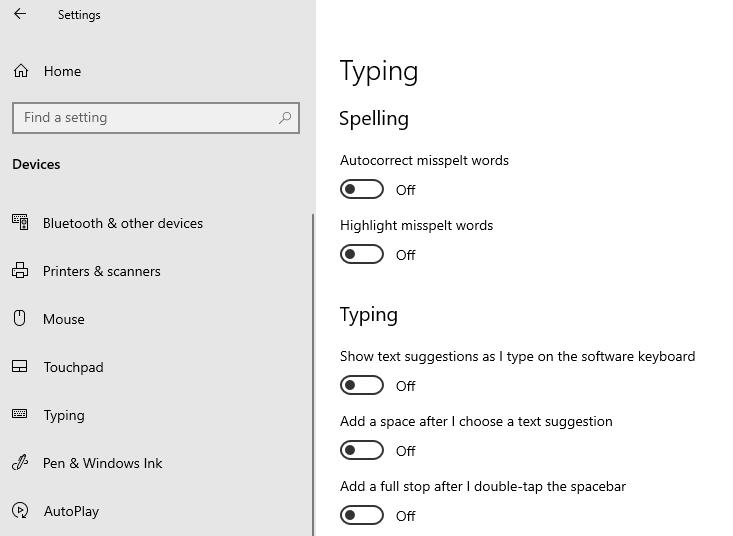
After yet another Micro$haft u/d of Win10 o/s, my settings for Devices>Typing>Spelling, Typing, Hardware Keyboard, etc, ad nauseum (all options OFF) had been reset to all options ON.
Thus any keyboard activity resulted in word suggestions, regardless of application. I failed to notice this as I rarely use MS apps.
Thanks for your suggestions.