


Windows 10 POP email accounts - Sent Messages are not being saved

Had to rebuild my Windows 10 system a few days ago. Backed up old profile and restored it after the rebuild, and it came up fine. Everything was there (I think) but today I notice that 2 of my POP accounts are not saving messages after I send them. No error messages. Those 2 accounts ARE listed under my InBox but not NOT listed under Sent.
When I click on the Sent folder itself (rather than one of the accounts under it), Thunderbird stops responding, and then I get the "a script on this page may be busy ..." warning.
Also, re-sorting ANY mailbox by e.g. date or sender takes forever, and eventually I have to close Thunderbird and restart it.
I don't see a rebuild or error checking tool. Not sure what to do. Thanks for any help.
選ばれた解決策
I may have found the answer. Of the 5 accounts, 1 is IMAP, 4 are POP. So 2 of the POP have a Sent folder and 2 do not.
When I go into Account Settings/Copies & Folders, the 2 misbehaving accounts are putting messages in Other/Sent on Local Folders. I changed that to Sent Folder on [the correct email address] and tested - working now.
Not sure how those options got changed. Not something I did intentionally. Had not even opened Account Settings since the re-install. But I can recover the messages now.
Thank you for helping me dig in. I learned some things!
すべての返信 (5)

Those 2 accounts ARE listed under my InBox but not NOT listed under Sent.
I'm not sure what that means. If you did arrange your accounts and folders in a somewhat different way than Thunderbird default, please explain what exactly you did.
A screenshot of your folder pane may also help. https://support.mozilla.org/kb/how-do-i-create-screenshot-my-problem
I get the "a script on this page may be busy ..." warning.
Try to start Thunderbird in safe mode. https://support.mozilla.org/kb/safe-mode-thunderbird
Does the warning still occur?
Also, what is your anti-virus software?
I don't see a rebuild or error checking tool.
Not sure what exactly you're looking for.
christ1 said
Those 2 accounts ARE listed under my InBox but not NOT listed under Sent.
As you can see in the screenshot, I have 5 email address folders under InBox, Junk, and Trash, but only 3 under Sent. 2 of my email addresses are not saving SENT messages. Brand new Thunderbird install (up to date) and I have not reorganized anything. I get exactly the same result in Safe Mode (although it organizes the folders differently, by email account. No Sent folder listed under those same 2 POP accounts.)
I get the "a script on this page may be busy ..." warning.Try to start Thunderbird in safe mode. https://support.mozilla.org/kb/safe-mode-thunderbird
Does the warning still occur?
No, no warning and sorts are instant.
Also, what is your anti-virus software?
Windows Defender and McAfee. I disabled all McAfee and restarted Thunderbird, but no change. I don't want to be running McAfee, but it was part of the reinstall and I hadn't disabled it completely yet.
I don't see a rebuild or error checking tool.Not sure what exactly you're looking for.
I thought there used to be an option to rebuild folders or something like that.
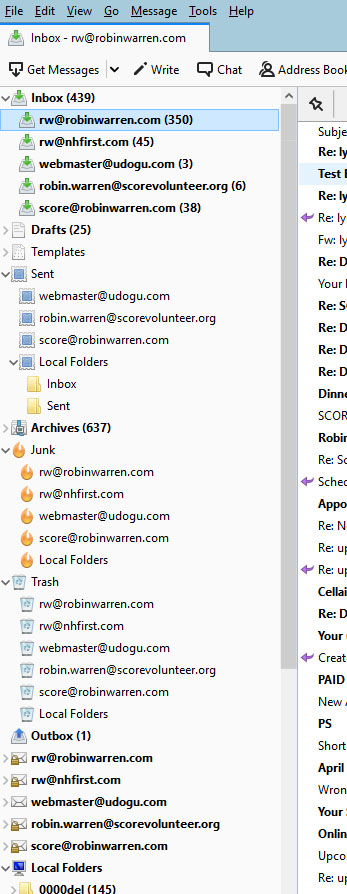
OK, a correction. When I first re-installed Thunderbird and loaded my backed up profile, everything worked, and there WERE Sent folders for all accounts. I was able to find messages I had sent earlier. THEN after a few days, sorting those folders took forever, got the error message while Thunderbird was "searching", during which Thunderbird would not let me look at a different folder or message or create a new one - had to restart Thunderbird each time to make the error go away. It was a few days after that that I noticed those 2 Sent folders were gone completely.
選ばれた解決策
I may have found the answer. Of the 5 accounts, 1 is IMAP, 4 are POP. So 2 of the POP have a Sent folder and 2 do not.
When I go into Account Settings/Copies & Folders, the 2 misbehaving accounts are putting messages in Other/Sent on Local Folders. I changed that to Sent Folder on [the correct email address] and tested - working now.
Not sure how those options got changed. Not something I did intentionally. Had not even opened Account Settings since the re-install. But I can recover the messages now.
Thank you for helping me dig in. I learned some things!
When I go into Account Settings/Copies & Folders, the 2 misbehaving accounts are putting messages in Other/Sent on Local Folders.
It may be related to POP accounts being set up for Global Inbox. http://kb.mozillazine.org/Global_Inbox
Windows Defender and McAfee.
There should not be two anti-virus applications running at the same time. As McAfee has been problematic in connection with Thunderbird, I'd get rid of it altogether.
These are some generic suggestions to avoid problems with anti-virus software.
Create an exception in your anti-virus software for the Thunderbird profile folder, so that the anti-virus real-time scanner will not scan it. http://kb.mozillazine.org/Profile_folder_-_Thunderbird
Don't let your anti-virus software scan incoming and outgoing messages.
Don't let your anti-virus software scan attachments.
Don't let your anti-virus software intercept your secure connection to the server.
Remove any add-ons your anti-virus software may have installed in Thunderbird.
Keep it working. http://kb.mozillazine.org/Keep_it_working_-_Thunderbird
And last but not least, backup your Thunderbird profile on a regular basis. https://support.mozilla.org/kb/profiles-where-thunderbird-stores-user-data#w_backing-up-a-profile