


stop FF doing DNS lookup when I hover over a link

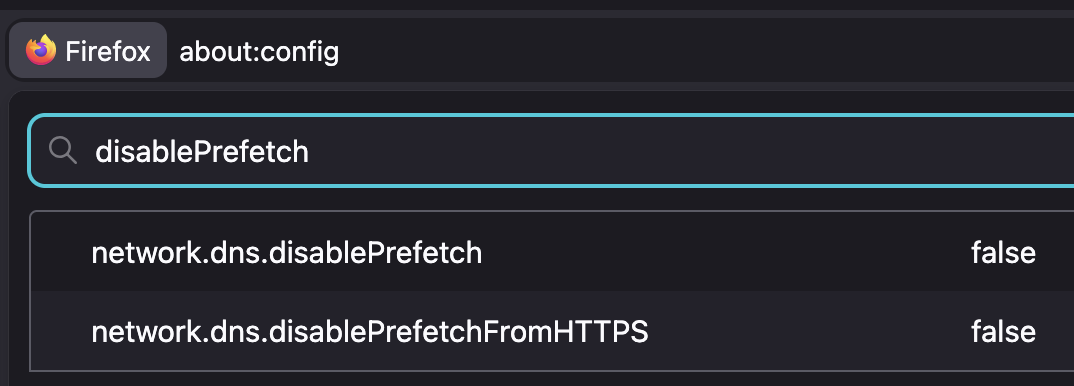
I start FF in safe-mode. I open a local page which includes only one URL. When I hover on this link I see (`tcpdump`) a DNS lookup being performed for this domain. I followed the suggestions from Mozilla but I still see this.
How do I stop this access.
I use FF "156.0 (64-bit)" on Fedora 44.
TIA
All Replies (8)
This is described in How to stop Firefox from making automatic connections section "Prefetching" › "Link prefetching" › "DNS prefetching": support.mozilla.org/en-US/kb/how-stop-firefox-making-automatic-connections#w_dns-prefetching
If the preferences documented there do not have any effect, it might be worth reporting either a pref bug, or a stale content at least. Thanks for checking.
Edeziri site na jbr
Yes, what how-stop-firefox-making-automatic-connections recommends was done. Surely I am not the first person to notice this?
I will appreciate hearing from other people doing the same. I simply run
$ sudo tcpdump -l port 53 -i eth1
where eth1 is the interface to my internet modem. Internal connections are on another interface.
I open this file
the conversation
[unfortunately the editor is hiding my actual text. How can I insert unmolested text???]
I then move the focus (the mouse) to another window and hover over the link, briefly, and immediately see
09:09:56.218995 IP e7.eyal.emu.id.au.52426 > h.gtld-servers.net.domain: 47967% [1au] HTTPS? theconversation.com. (60) 09:09:56.219101 IP e7.eyal.emu.id.au.59252 > 120.19.253.254.domain: 11696+ [1au] A? theconversation.com. (48) 09:09:56.219326 IP e7.eyal.emu.id.au.48388 > 120.19.253.254.domain: 3849+ [1au] A? theconversation.com. (48) 09:09:56.396917 IP 120.19.253.254.domain > e7.eyal.emu.id.au.48388: 3849 4/0/1 A 151.101.66.132, A 151.101.130.132, A 151.101.194.132, A 151.101.2.132 (112) 09:09:56.396917 IP 120.19.253.254.domain > e7.eyal.emu.id.au.59252: 11696 4/0/1 A 151.101.66.132, A 151.101.130.132, A 151.101.194.132, A 151.101.2.132 (112)
This is followed by many other probes, but I am only interested in the start of this activity which is timed exactly with the hover. Maybe an add-on is still active, despite the --safe-mode? Some of the probes may be from my local bind, listening to 192.168.3.7. My resolv.conf includes:
   nameserver 192.168.3.7
   nameserver 120.19.253.253
   nameserver 120.19.253.254
Edeziri site na mozilla888
[deleted, was due to a submit error]
Edeziri site na mozilla888
[Deleted, was due to a submit error]
Edeziri site na mozilla888
Well that's not what you posted above "I open a local page which includes only one URL" — which I did to confirm the pref.
data:text/html,link <a href="https://example.net">here</a>
Default preload: https://pastes.io/LLUmuUqd After disabling: https://pastes.io/B4DbpNEn
So you're only interested in hearing back from those not having the pref make any difference? Aight so that's not me, ta-ra!
What are you referring to by "not what you posted above"? I wanted to include my small file but the editor removed parts of it. I now attached an image of the file. HTH.
I can see how your second log shows there is no domain probe. Good. This is what I want but not what I get.
Is it possible, that despite the --safe-mode, an add-on (e.g. Adblock Plus) is activated?
TIA

Ah, now I understand — the instructions read as to follow the rendered link and hover content there — not as there's a sample markup to use (hint: the wiki markup syntax is covered in Markup chart, you probably want to wrap code in nowiki tags as well).
I can only verify things like this in an isolated setup, so: new profile, not enrolling into any productivity features, blank home/tab, doh off, search provider off (set to custom localhost with no autocomplete endpoint, as default, others disabled) and then about:networking to flush caches and restart, and flush again — and then test.
So I'd recommend doing that outside of your normal browsing setup first, if you can confirm the difference — and then look for what is different in your common profile and reduce the functionality there to comparable experiment.
mkdir sacrificial && firefox --profile ./sacrificial --no-remote --new-instance … for completely throwaway launching;)