


Even when I open a new tab in Firefox, the focus remains on the address bar. I'd like to know how to fix this.
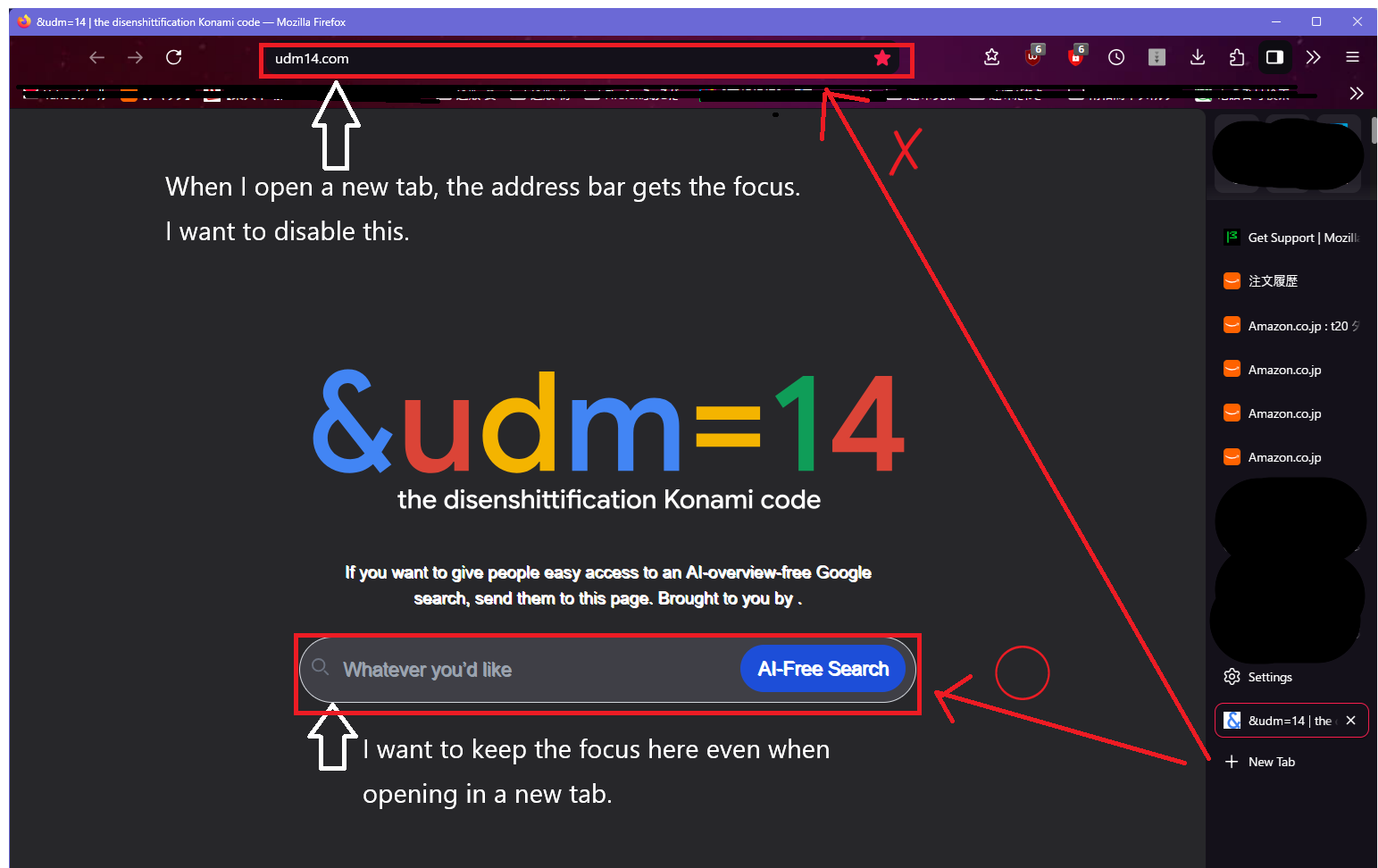
Even when I open a new tab in Firefox, the focus remains on the address bar. I'd like to know how to fix this. When I open a new tab, the address bar gets the focus, which I find inconvenient. Is there a way or setting to prevent the address bar from getting the focus and instead focus on the search box in the middle? I've searched online and tried the "settings in about:config" suggested in the search results, but it didn't solve the problem. Is it impossible? Firefox 153.0.3 64it
All Replies (11)
HI.
1. The owner of the website can direct the cursor or 2. you can create a file [userContent.css] to override or add instructions to any website you visit to effect your visual preferences.
Hello. Thank you for the advice. I didn't know it could be controlled with [userContent.css].
Well userContent css can style anything on the site, hide anything and force the focus to whatever you like.
I say that but I force the focus on my own website, but I hide suggestions on bank sites etc. by selecting the ID of the item and then adding ##id## {display:none} for example, so I imagine
??inputID:focus { background: white; border:2px solid blue}
Thanks for the information. I tried running the '[userContent.css]' you told me about. Is '??inputID:focus { background: white; border:2px solid blue }' okay? I'd like to use it as a reference. Is it okay to just paste it into my PC's '[userContent.css]' and save it, then restart Firefox?
I don't want to derail the convo however setting any :focus CSS decoration won't magically trigger the element's focus.
If you set udm14 as your home page, it correctly has the focus on its own search form.
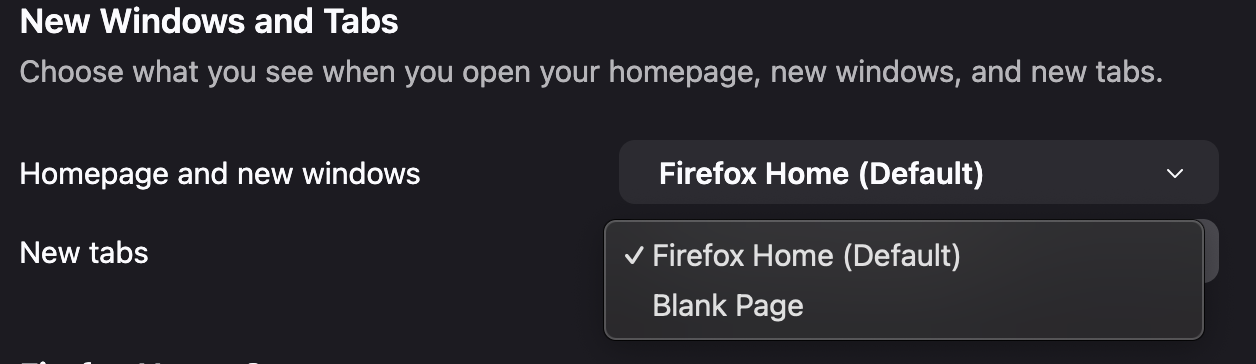
If you set udm14 as your new tab… well, then it's not done by the browser because you can't (for similar timing and interactivity reasons), so you use an addon or hack for that — you might need to check with their authors how they work around such things — because the browser most likely thinks you only have blank page shown at this point.
If none of the above sounds familiar, then you're probably looking at some other workflow that you might need to describe in more detail (i.e. how you want to focus a currently shown page's element while opening new tabs — how you'd navigate these then? or you want your current page's search form's results to open as new background tabs without switching to them?)
Hello. I checked. The setting to open in a new tab is set with 'udm14'. Does that mean 'userChromecss' won't work unless I set it to open a new tab with 'Google'?
Ideal: - Open a new tab with 'udm14' → focus (cursor) goes to the central search box → search as is → 'my desired behavior'
Current: - Open a new tab with 'udm14' → focus (cursor) moves to the address bar → end up searching in the address bar → behavior against my intention
Since there's no particular bug or inconvenience, maybe one option is to just keep using it as it is.
Is it okay to just paste it into my PC's '[userContent.css]' and save it, then restart Firefox?
yes but that was a vague piece of code so it won't work.
Here is an example of my userContent.css
@namespace url("http://www.w3.org/1999/xhtml");
@-moz-document url("community.frame.work"){
:root{
--header_background: #f49a27!important; } }
/*/stylesheets/color_definitions.scss:5*/
@-moz-document domain(co-operativebank.co.uk){
#everyday-extra-upgrade-panel-current-0{
display:none!important }
The last bit.
1. Identify the site: in my case a bank 2. find the 'object' ID in this case #everyday-extra-upgrade-panel-current-0 3. Add code to hide it { display:none!important }
Given the message from jbr, I will see if I can force the focus on my bank site :)
amoun, thanks for the info. The details you shared didn't work with my setup and environment. It works with other 'userChromecss', but the 'userChromecss' you told me about didn't work. I'll continue using it as is for a while. I really appreciate the info you provided.
There is no built in Firefox functionality to open any arbitrary page as a new tab. So this must be provided by an addon. Check with them if they can affect this.
amoun, thanks for the info. The details you shared didn't work with my setup and environment. It works with other 'userChromecss',
Hi.
It was userContent by the way to effect sites userChrome is for formatting the actual browser.
However I have just been looking at my bank and the input boxes are not accessible as they are loaded via a javascript and I can't access their ID etc.
Actually on my Win 11 and Fx 153 I have just noted if I click on a Bookmark, which I have set to open in a new tab, the focus isn't on the address bar, it isn't anywhere.
UPDATE:
OK even more strange. I have just gone to the site https://udm14.com/ and the focus did automatically go to the search bar ????
So could you check this setting
Settings > Tabs and Browsing > When opening links or media in a new tab, switch to it immediately
Edeziri site na amoun