


Thunderbird - Calendars disappeared - I was sizing the screen and it sized them all the way to the right.

Hello,
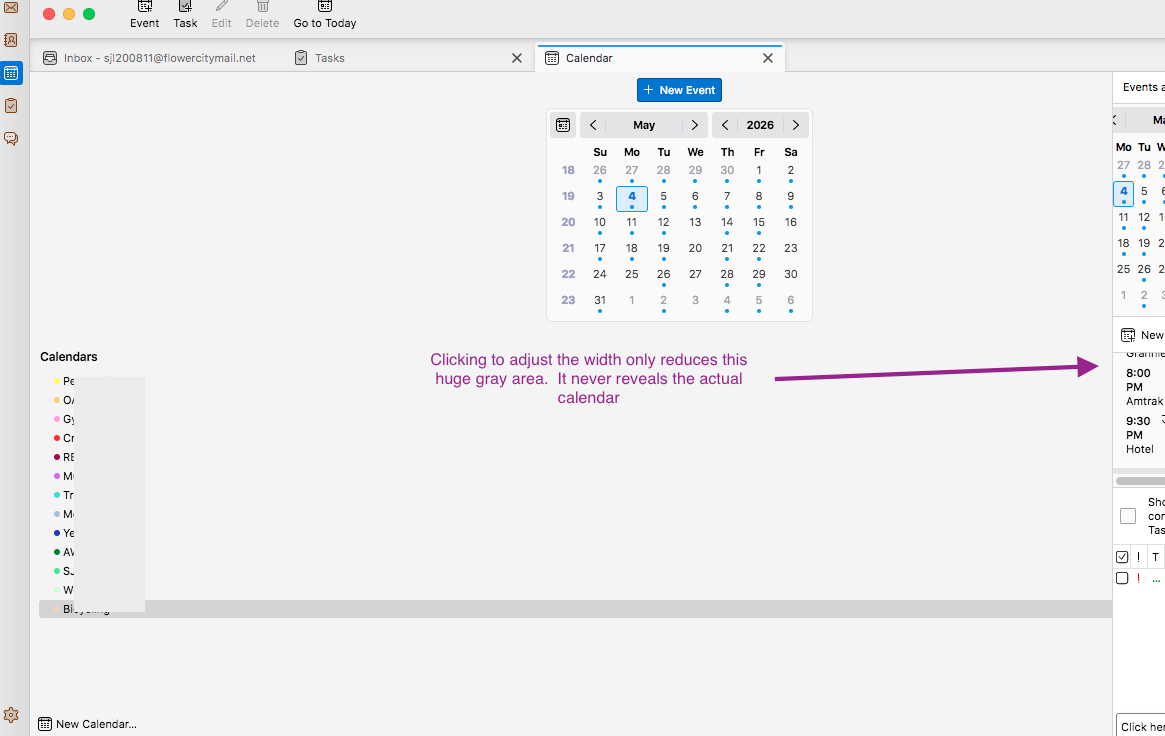
I was adjusting the width of the calendar list, and every time I clicked on the adjuster icon (that line and arrow that you slide to grow or reduce area), the line moved to the right automatically, until the line went to the far right side and all you see is the sidebar. I can't slide it back.
I have quit Thunderbird and re-launched, and also restarted the Mac. No change.
Thanks for your assistance.
All Replies (3)

When you pause the mouse cursor over the vertical dividing line that your arrow is pointing at, it should change to a horizontal double-sided arrow. Click and hold, and you can drag it to the left. This is for Windows and Linux - I expect Apple works similarly.
Thanks, but the issue is that, when I hover, I *don't* get the horizontal double-sided arrow between the sidebar and the calendar. It's only between the sidebar and Events & Tasks.
This problem only showed up yesterday. The horizontal double-sided arrow has been working fine for years.
What I can see of that partially-showing pane looks unusual. It seems to have elements of both Calendar and Tasks arranged together in a way I haven't seen before. However, I have never used Tasks, so maybe it's just that I'm unfamiliar with it. But do you use any tricks/hacks to manipulate the interface, like a custom userChrome.css file?
Some things I would try...
- Maybe it's a misbehaving add-on. Restart Thunderbird in Troubleshoot Mode (<Help | Troubleshoot Mode>). which will temporarily disable all add-ons.
- Try toggling the various Calendar View options found in the <View | Calendar > and <View | Today Pane>, also <Events and Tasks | Calendar> and <Events and Tasks | Tasks>. Maybe exercising those settings will tickle the resize cursor back to life.
That's all I can think of at the moment.