


Task filters in the Today pane are greyed out

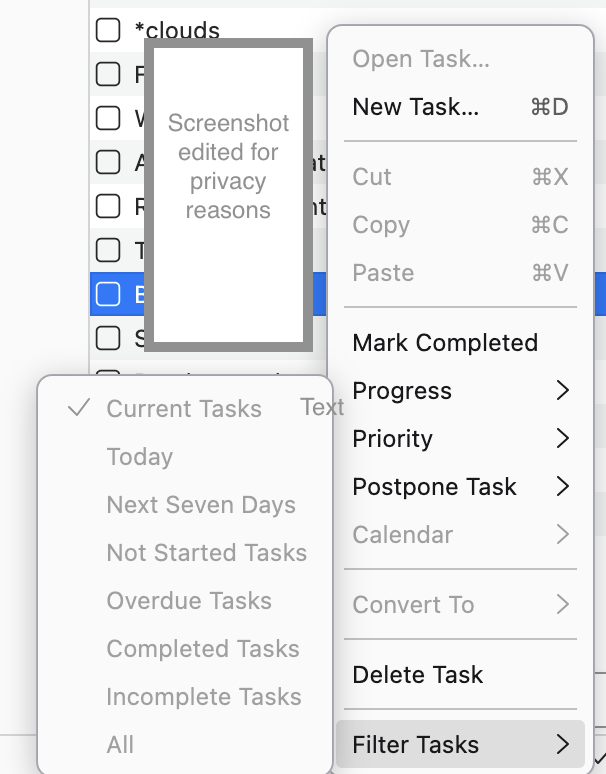
My iCal calendar has been connected to Thunderbird for ages and the connection has survived several updates on both ends. The Server is Nextcloud (currently 32.0.0.13). In the Today pane next to my Inbox I always have the "Tasks" view open. Creating, editing and completing tasks works as it always did. But some time ago (I don't know when exactly) all options in the "Filter Tasks" sub menu became greyed out. This used to work and I'm not aware of any change I made.
The same happened on my other system which runs Thunderbird 149.0 as the ubuntu-snap-build supplied by Ubuntu on Ubuntu 24.04.
Is there something I can do or is this a Thunderbird bug?
All Replies (5)
Hello there Joendres.
Something seems to have frozen. We can try to wake up this menu. This issue is known as a 'UI glitch' with CalDAV. Could you right-click on the Nextcloud calendar in the calendar tab? Select Properties > uncheck Offline Support > click OK and wait a few seconds. Then, reopen Properties and check Offline Support again. This usually forces the system to rebuild the local SQLite index of your task menu, which should wake it up
Yes,a bug it is. Greetings Googlethunderbird.
Edeziri site na Googlethunderbird.
Hi Googlethunderbird,
Thanks for the hint. But it did not work. I even tried to unsubscribe and subscribe again - no improvement.
I have several calendars subscribed from different sources. I tried the steps you described for all of them at once - no improvement.
Is there anything else I can try?
Is the bug on bugzilla already?
TIA, Joendres
Hello there
It has been noted that there are several reports. Thunderbird is undergoing a massive rewrite of the calendar system. Several other functions have been disabled, except for local ones. You might be caught in the middle of a rewrite session or experiencing a bug
Edeziri site na Googlethunderbird.
Hello there
Yes, you can try the other two steps that were included with the first one?
Hello there
Sync related issues Nextcloud 32 is very recent. There may be a slight mismatch between the software, Thunderbird, and certain Linux or daily Thunderbird settings. Data interpretation acts differently. Go to Settings > General, scroll to the bottom, and click Config Editor. Search for calendar.view.visible or calendar.list.sortOrder. Warning: Do not change values unless instructed. Look for calendar.caldav.sched.enabled; setting this to true can sometimes resolve sync-related UI locks.
Is it a Bug? Yes, likely. There have been several
Edeziri site na Googlethunderbird.