


Simply opening & closing a calendar event sends updates.
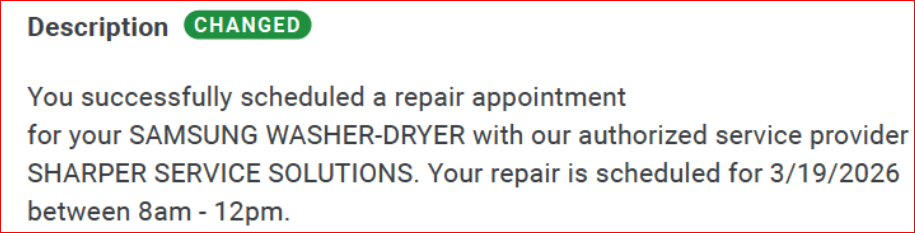
It seems lately that when I simply open a calendar entry to see what the contents are, then close it without making any changes, it sends an update to all those involved that something changed (as seen in the picture).
Also, when I accept an invite event and tell it not to send a response, it always does. This has been happening for as long as I can remember, and I cannot figure out a way to stop it, no matter what I do.
Anyone have any ideas for either of these issues?
All Replies (9)
Hello there Chuck
Right-click your calendar, select "Properties," and uncheck "Read Only" to ensure proper syncing.
What calendar do you use?
Stop automatic responses
To stop automatic responses, go to the Config Editor. Navigate to Settings > General > Config Editor. In the search bar, type calendar.google.enableEmailInvitations. Double-click to set this value to 'false', then restart Thunderbird
Edeziri site na Googlethunderbird.
Hello there Chuck
Using filters
Disable the auto-response filter by opening message filters and marking the box as turned off
Edeziri site na Googlethunderbird.
Hello there Chuck
This persistent issue in thunderbird , where do not send a response is ignored
Change calendar properties Go to the Calendar tab, right-click your calendar on the left, and select Properties. Check there to see if there are settings that force replies. Also, make sure that your email address is correctly linked to the calendar.
If the issue persists , the issue might be a corrupted configuration.try creating a new thunderbird profile via the profile manager to see if this issue is resolved,as suggested
Turning off lightning
In case that you use lightning try to turn off that add on.
Re-enable back that add on to see for behaviour.
You might have a bug
If it s still sends notifications to surrounders.
Edeziri site na Googlethunderbird.
Googlethunderbird. said
Right-click your calendar, select "Properties," and uncheck "Read Only" to ensure proper syncing.
Good morning.
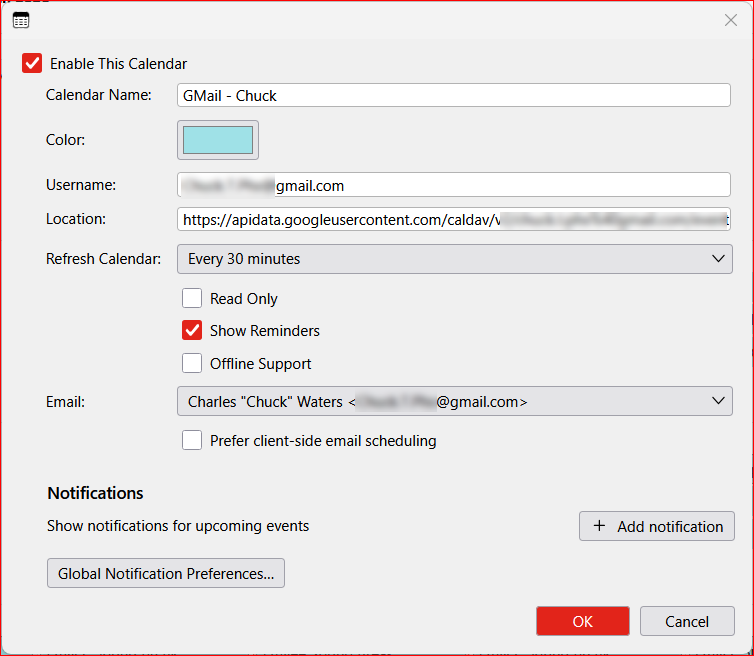
That was the very 1st box I made sure was unchecked when I originally added my GMail account / calendar last month.
Googlethunderbird. said
What calendar do you use?
I use GMail as my main calendar.
Stop automatic responses To stop automatic responses, go to the Config Editor. Navigate to Settings > General > Config Editor. In the search bar, type calendar.google.enableEmailInvitations. Double-click to set this value to 'false', then restart Thunderbird
I just completed this. When I copied and pasted what to type, I got a + sign. I didn't change the default (I think it was boolean) and when I clicked the + it was true. I double clicked and changed to false. I will see what happens next time I get an invite.
I appreciate it because that is such a PITA - 98% of the time I say don't send a response, and they always get one.
Hello there Chuck.
I did read that message, Chuck. We can go through a few subjects
Can you relink ?
Remove the google calendar in thunderbird,
And add it again via : calendar> new>on the network.
Can you send us smtp settings Please send us your Smtp settings?
Troubleshoot mode Start up in this mode to check if an extension is the culprit here. https://support.mozilla.org/en-US/kb/troubleshoot-mode-thunderbird
Clear cache You can actually clear the cache by going to Calendar Properties in Thunderbird. Right-click your calendar, select Properties, and choose the option to refresh the cache. Alternatively, turn it off and on temporarily.
Use https://support.mozilla.org/en-US/kb/how-to-make- screenshots
https://support.mozilla.org/en-US/kb/troubleshoot-mode-thunderbird
Has it been useful to be able to use any of these subjects?
Edeziri site na Googlethunderbird.
Hello there Chuck
Overriding thunderbird Google often overrides rules set in Thunderbird. Also, a server-side issue is already there causing it
That is why I recommend deleting the Google Calendar and reinstalling it. Did it changed something?
Edeziri site na Googlethunderbird.
Hello there Chuck
To give you that second view Deleting that Google Calendar is a good idea; it might be outdated. OAuth 2.0 data from 2025/2026 is considered outdated, as the new standard is OAuth 2.1. Here is a tip: Remove your current Google Calendar in Thunderbird. Go to File > New > Calendar > On the Network. Enter your email, leave the location blank, and follow the prompts to authenticate. Re-adding it this way will give you the most recent stable connection. If you leave the location form empty, Thunderbird will handle it automatically.
Edeziri site na Googlethunderbird.