


Increase history amount when clicked on the History Menu

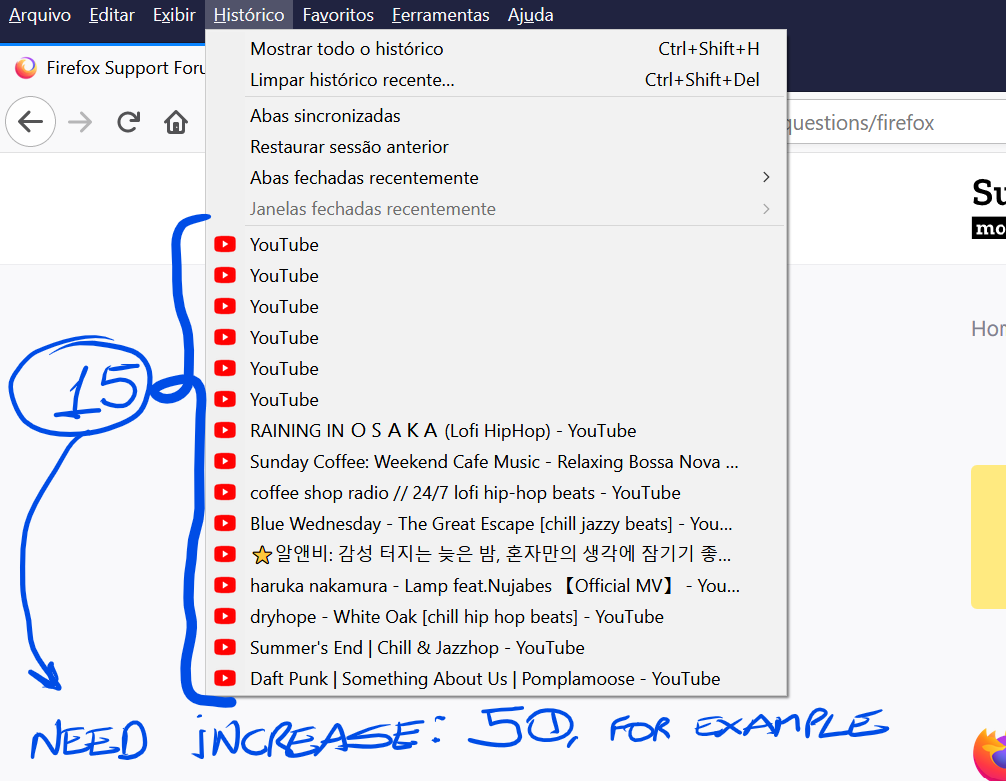
Hi..... My Monitor it's 32" x 4K, so I need to Increase (a lot) the amount of History after I clicked on the History Menu.
For me a value between 30 and 50 would be great
see the image to be clear
Thanks
(I turned about:config and found nothing about it)

All Replies (2)
This place query is fixed in the source code to 15 results.
- place:sort=4&maxResults=15
- https://searchfox.org/mozilla-release/source/browser/base/content/browser-places.js#633
As a workaround you can create a bookmark on the Bookmarks Toolbar and set a higher value.
- place:sort=4&maxResults=50
- https://developer.mozilla.org/en-US/Mozilla/Tech/Places/Places_query_URIs
You need to do a cut/paste to a different folder or close and restart Firefox to make the bookmark work as a smart folder.
Thanks for the help, but could be possible in the future put this configuration
   place:sort=4&maxResults=15
   https://searchfox.org/mozilla-release/source/browser/base/content/browser-places.js#633
in about:config and when we click on History Menu show the desired amount??? Instead of being in the source code, be configurable in about: config
Thanks
Edeziri site na tomson