


Goudi Handfooled font not rendered correctly in FF 58.0.1

As seen in the screenshot, "Titelblad" is rendered wrong in the page but correctly in the fonts inspector. What can I do to fix this?
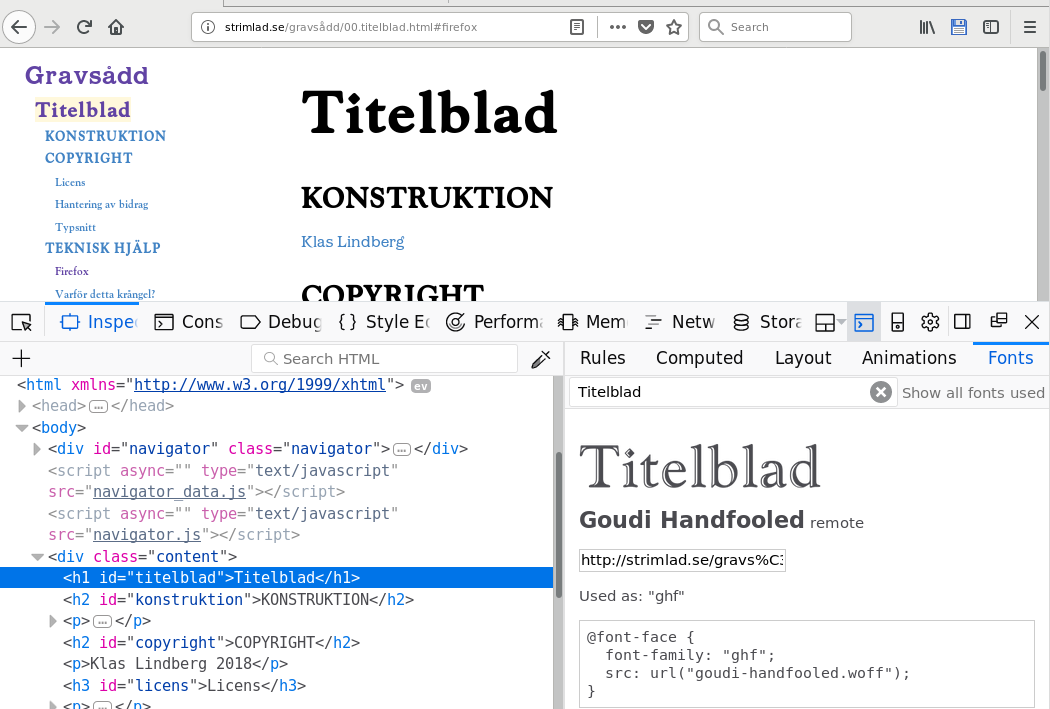
Asịsa ahọpụtara
I found the problem, or at least a solution. The font displays wrong unless I set the style as { ... font-weight: bold; }
Haven't looked into the metadata of the font but perhaps there's something in there that would explain this.
For whatever reason, the font renders as expected in Chromium without the font-weight setting. Whether that is actually correct or not I have no idea :)
Gụọ azịza a na nghọta 👍 0All Replies (2)
http://strimlad.se/gravs%c3%a5dd/00.titelblad.html
It's OK for me.
Maybe it's something with remote fonts? Go to about:config and check gfx.downloadable_fonts.enabled == true.
Asịsa Ahọpụtara
I found the problem, or at least a solution. The font displays wrong unless I set the style as { ... font-weight: bold; }
Haven't looked into the metadata of the font but perhaps there's something in there that would explain this.
For whatever reason, the font renders as expected in Chromium without the font-weight setting. Whether that is actually correct or not I have no idea :)