


Which installed fonts will Thunderbird actually use?

I've been using Thunderbird for about two months now and I just realized that Thunderbird (150.0.1) seems to be unable (or unwilling) to use some of the fonts that are on the computer (Windows 10, plenty of RAM and disk space).
Let me explain that I don't send a lot of emails, and most of the ones I do send are just a few lines so I had not had any reason to bother with the font -- the default font was fine -- until today...
Today my experience with fonts in Thunderbird was extremely disappointing. It started when I was composing an email and I copied/pasted some text from a web page into the email. Rather than treating the pasted text as simply text to have in the default font, Thunderbird put it in some strange font and size. This might have been Thunderbird's attempt to use the font from the website but neither the font nor the size resembled the text that I had copied/pasted. That was when I noticed that Thunderbird does not let you choose the actual size but only offers the choice to make text larger or smaller. Making the text smaller was sufficient for that particular time.
As I finished the email, I tried to sign my usual signature. Thunderbird lets you choose the font but once I had chosen the font that I routinely use for my signature, I discovered that Thunderbird totally ignores the choice that it just let you make. Instead of displaying the signature in the chosen font, it displayed my signature in a plain sanserif font.
I could live with a limited choice of fonts -- I have used another program where the only choices were serif and sanserif -- but I cannot understand why Thunderbird would offer a font choice menu that includes all my installed fonts when it actually only honors three choices. The only fonts reliably used seem to be some generic sanserif font that Tunderbird calls Helvetica/Ariel, a generic serif font that it calls Times and another serif font it calls Courier.
The dropdown menu lets me choose any of the fonts I have installed, some of them display properly while composing the email, others don't. If I send the email to another of my email addresses, Thunderbird displays the text the same way -- some fonts are correct and some fonts get replaced with one of Thunderbird's generic fonts.
I'd really like to have all my fonts available -- but that doesn't seem to be possible with Thunderbird so I guess I need to figure out which fonts Thunderbird is willing to use.
Solusi Terpilih
Interesting you post a question about fonts without essentially considering the world has moved on from true type fonts. Many are simply not suitable for use with unicode because they predate it's widespread use.
I googled the font karthlenie because it is not something I am familiar with. It dates from 1997 apparently https://www.fontspace.com/kathleenie-font-f9236
I assume that is the actual font you are talking about. I installed it and found it to be sadly lacking in Unicode support. Something all email has used for decades. It's basic Latin block is mostly missing let alone the rest of the normal language blocks that a web safe Unicode font would have. (you do not know if the user is reading in English of one of the Cyrillic languages really it might even be Hebrew
Now lets talk about display. Even if Thunderbird displayed it on your system correctly . How is the recipient going to know they need to go to some obscure website and install an obsolete font to display what you have written as you intended. The short answer is they are not. So what they see will not be what your wrote, or at least not how you intended it to be seen.
Enter web safe or email safe fonts. They amount to largely the same thing as both use HTML to format text and render it. this is a basic tutorial on is from the consortium that sets web standards https://www.w3schools.com/cssref/css_websafe_fonts.php they are widely installed on most operating systems.
The fonts you select to use can be from other fonts named on your system, but to display correctly they must also be installed on the recipients system. That means if they are read on a phone on an IOS or Android operating system then that font or one from that same family must be installed and the same family definition is very broad.
As you have no control of the readers environment you have to use caution when setting a font. Specifying a cursive font sounds good, until you look at how that is rendered when the system does not have this. This is where the font family is used as a fallback if specified. I will link to information on setting these in CSS, but how individual browsers and mail clients act when it is not specified, which is the normal situation in an email, is not all that predicable. https://www.w3schools.com/css/css_font.asp Essentially if you specify a font it may be rendered in Helvetica if the system you read it on does not have the corresponding font installed. Thunderbird's display is quirky with these older obsolete fonts I will grant. But it is not really the issue. The use of random fonts in email is and really it would be better is Thunderbird just refused most font selections, but that is an entirely other issue.
I will not attempt to go into downloadable fonts from CSS, despite them being available in email is is a far more technical subject that the usual point here and click. It involves hand crafting CSS and inserting it into the message as HTML. Well beyond the skill set of most general email users.
The Mozilla developer web site has this to say about selecting fonts for rendering. https://developer.mozilla.org/en-US/docs/Web/CSS/Reference/Properties/font-family
Font selection does not stop at the first font in the list that is on the user's system. Rather, font selection is done one character at a time, so that if an available font does not have a glyph for a needed character, the latter fonts are tried. When a font is only available in some styles, variants, or sizes, those properties may also influence which font family is chosen.
That amounts to a rendering mess in my opinion. If you want script fonts etc I strongly suggest using an image. It was true on the web thirty years ago and it really remains largely true. Things are better, but pretty really takes work.
Semua Balasan (3)
Your 'problem' began when you pasted HTML text into the message. clicking edit>paste without formatting would have been the preferred approach. When you copy text from a website, the text being presented on your PC has normally be automatically resized for viewing, but when you copy the text and its embedded HTML, the results in an email are usually disappointing, as you discovered.
On your question, Thunderbird can use all the fonts on your PC. In fact, Thunderbird is likely more capable of fonts than any other email client —and that is sometimes the challenge. The font settings in Settings>general are for how messages are displayed to YOU, and the font settings in settings>composition are how fonts appear to recipients. That is, in settings>composition, when you have font set to variable-width and font size set to medium, your email is sent without font or font size specified, allowing the recipients to see the message in their preferred font. You, on the other hand, see your message in your font and size.
I provide more detail on that in this link that I answered a couple of years ago: https://support.mozilla.org/en-US/questions/1462509 Follow in DETAIL my suggestions about Latin and Other Writing Systems, and your fonts will be consistent.
Sorry, David NO. As I clearly stated in my original post, Thunderbird allows me to choose any of my installed fonts, but it only displays some of them in the chosen font.
It seems that your response is almost entirely about choosing the default font. I am not concerned about the default font, the system default is acceptable for 90+% of the emails I write, but occasionally I need (or at least want) to use some other font for parts of an email message I am composing.
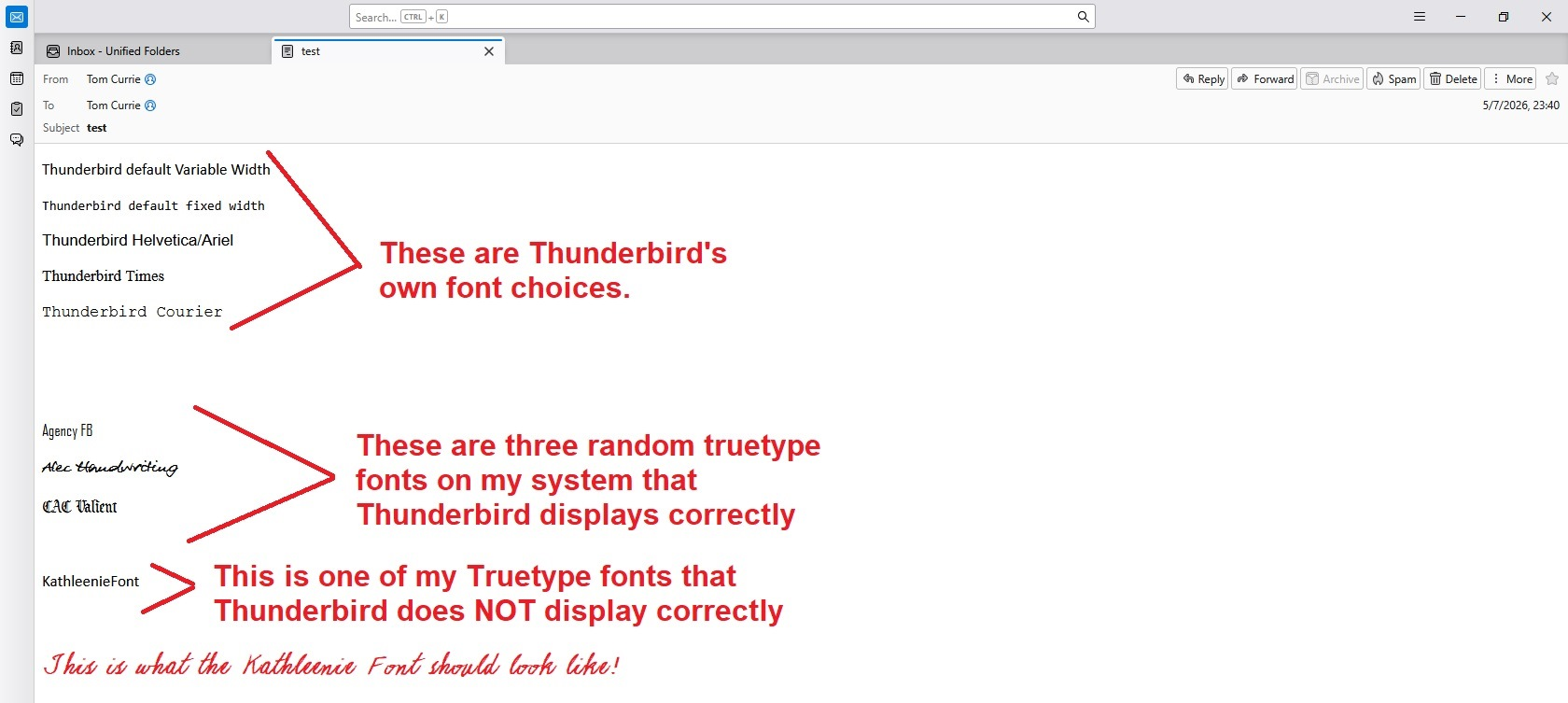
I can select any font while composing a message, but Thunderbird will display the text in that font for some of my fonts while some other fonts are displayed using some sort of generic substitute that Thunderbird displays instead of the selected font.
Likewise if I then send that message to another of my email addresses Thunderbird displays the received message the same way it displayed the message being composed. The fonts that displayed correctly while creating the email are displayed correctly in the received message, but the fonts that Thunderbird refuses to display correctly while creating the email are displayed using the same substitution when the message is received.
Because the received message does look just like the message I composed, I can live with this, but I am trying to understand why/how Thunderbird displays some fonts correctly and not others. The attached picture shows the situation.
Diperbarui oleh n4aof pada
Solusi Terpilih
Interesting you post a question about fonts without essentially considering the world has moved on from true type fonts. Many are simply not suitable for use with unicode because they predate it's widespread use.
I googled the font karthlenie because it is not something I am familiar with. It dates from 1997 apparently https://www.fontspace.com/kathleenie-font-f9236
I assume that is the actual font you are talking about. I installed it and found it to be sadly lacking in Unicode support. Something all email has used for decades. It's basic Latin block is mostly missing let alone the rest of the normal language blocks that a web safe Unicode font would have. (you do not know if the user is reading in English of one of the Cyrillic languages really it might even be Hebrew
Now lets talk about display. Even if Thunderbird displayed it on your system correctly . How is the recipient going to know they need to go to some obscure website and install an obsolete font to display what you have written as you intended. The short answer is they are not. So what they see will not be what your wrote, or at least not how you intended it to be seen.
Enter web safe or email safe fonts. They amount to largely the same thing as both use HTML to format text and render it. this is a basic tutorial on is from the consortium that sets web standards https://www.w3schools.com/cssref/css_websafe_fonts.php they are widely installed on most operating systems.
The fonts you select to use can be from other fonts named on your system, but to display correctly they must also be installed on the recipients system. That means if they are read on a phone on an IOS or Android operating system then that font or one from that same family must be installed and the same family definition is very broad.
As you have no control of the readers environment you have to use caution when setting a font. Specifying a cursive font sounds good, until you look at how that is rendered when the system does not have this. This is where the font family is used as a fallback if specified. I will link to information on setting these in CSS, but how individual browsers and mail clients act when it is not specified, which is the normal situation in an email, is not all that predicable. https://www.w3schools.com/css/css_font.asp Essentially if you specify a font it may be rendered in Helvetica if the system you read it on does not have the corresponding font installed. Thunderbird's display is quirky with these older obsolete fonts I will grant. But it is not really the issue. The use of random fonts in email is and really it would be better is Thunderbird just refused most font selections, but that is an entirely other issue.
I will not attempt to go into downloadable fonts from CSS, despite them being available in email is is a far more technical subject that the usual point here and click. It involves hand crafting CSS and inserting it into the message as HTML. Well beyond the skill set of most general email users.
The Mozilla developer web site has this to say about selecting fonts for rendering. https://developer.mozilla.org/en-US/docs/Web/CSS/Reference/Properties/font-family
Font selection does not stop at the first font in the list that is on the user's system. Rather, font selection is done one character at a time, so that if an available font does not have a glyph for a needed character, the latter fonts are tried. When a font is only available in some styles, variants, or sizes, those properties may also influence which font family is chosen.
That amounts to a rendering mess in my opinion. If you want script fonts etc I strongly suggest using an image. It was true on the web thirty years ago and it really remains largely true. Things are better, but pretty really takes work.