


No gap after last messge in version 115

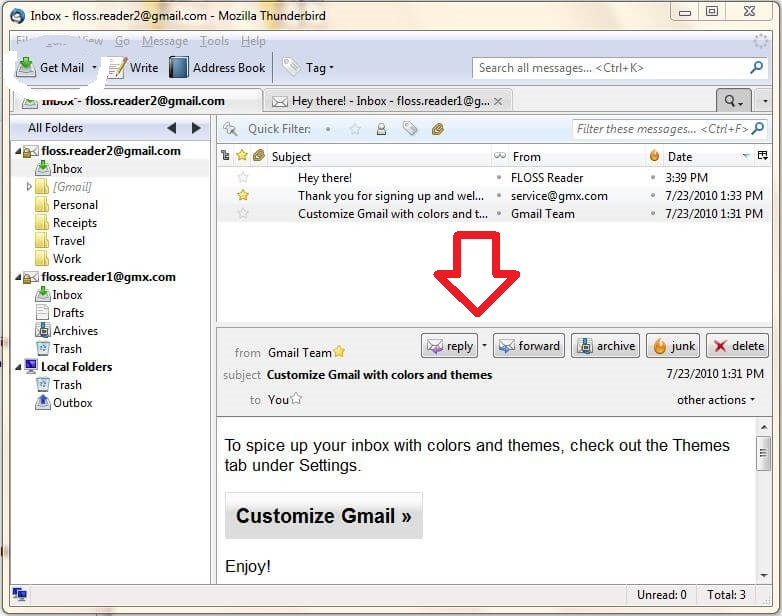
Hi. In Thunderbird, there always was a gap between last message in the message list and a message window, so you can always understand, were there any new messages or not. There was also possible to regulate this gap by mouse. After upgrade to version 115 ("Supernova") there is no gap anymore. And you cannot change it. I try to attach picture which gap I mean.
Semua Balasan (6)
I would expect the gap to not return.
That's pity :(
I've got two version currently running. 102.15.1 and beta 118.0b4
I can inform everyone that I do get a blank space between bottom of list and Message Pane header. But it relies on three things. 1. The 'Message List' aka Thread Pane contains a small number of emails. 2. The Message List does not have a scroll bar enabled on the right side. 3. The 'Message Pane' is lowered to below the end of list to expose the blank area.
If there are too many emails in list then Message Pane cannot be lowered to a point that exposes the end of list.
I found a solution for this problem: must to switch off "Message List Header" parameter in View -menu. I hate this new Thunderburd anyway.
ikl said
I found a solution for this problem: must to switch off "Message List Header" parameter in View -menu. I hate this new Thunderburd anyway.
So what you mean is the new 'Message List Header' toolbar was forcing your Message List to be much lower than previous version. It would not be convenient to lower the Message Pane even further down, so you chose to hide the 'Message List Header' instead. Please note the 'Quick Filter' option that was auto on the 'Message List Header' toolbar can be put onto the Unified Toolbar.
Also note that space is only visible because you do not have many emails in the list.
Yes, you are right. Sorry, wrong answer.