


Print Dialogue Box 91.2.1

Give me back an option to have the classic print dialogue box open instead of the new "in screen" option. This is time consuming and frustrating as the new "simple option does not contain what I need.
Semua Balasan (12)

What is it that the new print UI doesn't have?
Toggle print.tab_modal.enabled to false in Config. editor in Preferences to show the system print dialogue.

Thank you sfhowes. That worked perfectly. I frequently print out just the first page of an email and the new print UI required several extra steps to set that option. I spent 2 hours searching for the solution, so thank you for providing it in a usable instruction. (Someone else had given the instruction to Toggle print.tab_modal.enabled, but didn't actually say where that showed up in the Settings.)
Stans said
What is it that the new print UI doesn't have?
Change paper size, print only certain pages.
Diperbarui oleh adrianjsc pada
sfhowes said
Toggle print.tab_modal.enabled to false in Config. editor in Preferences to show the system print dialogue.
Sandy that doesn't work, it alters the print dialogue box in Firefox not Thunderbird.
Adrian, it worked for me in Thunderbird. I am on a Mac running Catalina with the current version of Thunderbird...if that makes a difference.
Sames said
Adrian, it worked for me in Thunderbird. I am on a Mac running Catalina with the current version of Thunderbird...if that makes a difference.
I haven't downloaded the latest version of FF yet. There have been too many changes recently that I dislike, TBH thinking of dumping FF completely. Seem like every update these days changes so much that I spend a day switching things back to my preferences.
The only reason I haven't dumped FF already is my partner and I travel with 1 lap top. He uses and has all his bookmarks on chrome and mine are all on FF.
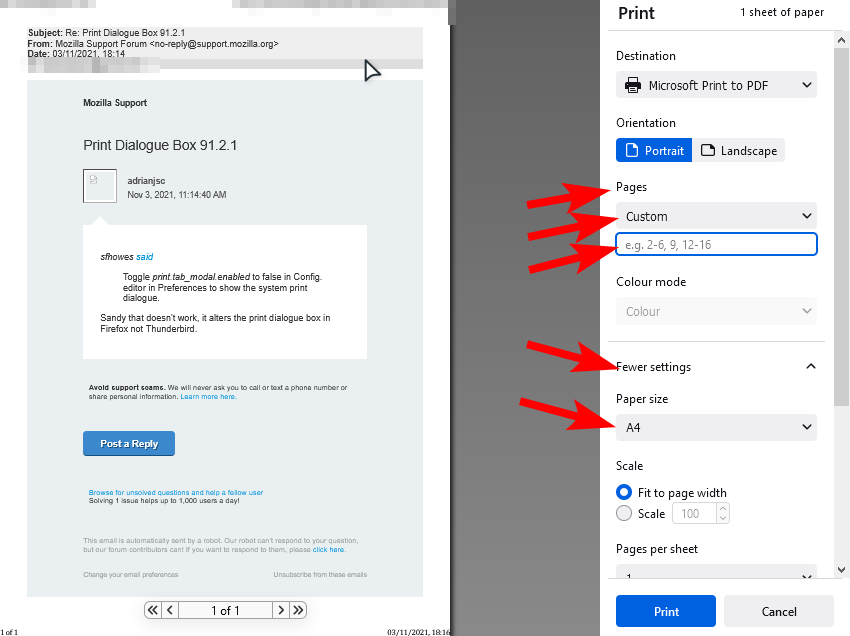
Stans, In both those cases that you point out (page size or page number), you have to do a pull down menu and select an option on the pull down menu and then choose your paper size or page number. In the system print dialogue both those operations are one click (ie no pull down menu).
Sames said
In the system print dialogue both those operations are one click (ie no pull down menu)
Only for the page range. For paper size, the option is buried behind the Preferences button, so definitely not one-click.
Also, the print.tab_modal.enabled preference works in Thunderbird just fine, at least on my end.
Even more frustrating, I just tried printing and it appears to be stuck permanently on "microsoft print to pdf". I changed it several times to my normal printer but it just reverts back to the above none printer printer.
I just got thunderbird updated to 98.0b2 and toggling print.tab_modal.enabled to false doesn't work anymore.
Any ideas? I really, really despise the new dialogue and I need to get rid of it.