


The folder inbox is full, and can't hold any more messages. To make room for more messages, delete any old or unwanted mail and compact folder.

Good Day,
I have a problem in my account. When i try to get message from mozilla thunderbird version 45.4.0, this alert pops up! "The folder inbox is full, and can't hold any more messages. To make room for more messages, delete any old or unwanted mail and compact folder."
I already 1. empty inbox 2. delete and create inbox 3. repair inbox 4. compact inbox
Semua Balasan (5)

Try to start Windows in safe mode with networking enabled. - Win10 https://support.microsoft.com/en-us/help/12376/windows-10-start-your-pc-in-safe-mode - Win8 https://support.microsoft.com/en-us/help/17076/windows-8-startup-settings-safe-mode - Win7 https://support.microsoft.com/en-us/help/17419/windows-7-advanced-startup-options-safe-mode#start-computer-safe-mode=windows-7
Still in Windows safe mode, start Thunderbird in safe mode. - https://support.mozilla.org/kb/safe-mode
Does the problem go away?
Christ,
I tried the procedure you gave me re; running windows in safe mode but still it doesn't work.
I also tried to add account from other pc that has TB that works properly and same account that has a problem, still the account that has problem got the alert while the other account works properly.
right click the account in the folder pane, select properties.
What is the size on disk?
Size on disk: 0 KB
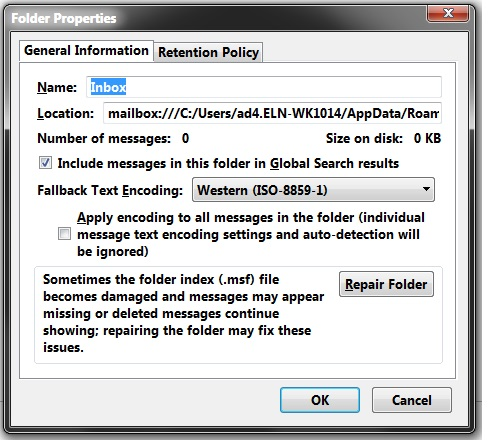
I tried the procedure you gave me re; running windows in safe mode but still it doesn't work.
What didn't work? Did you start Windows in safe mode?