


Disable some hovering bg color & modify a bg color on Tb's compose window

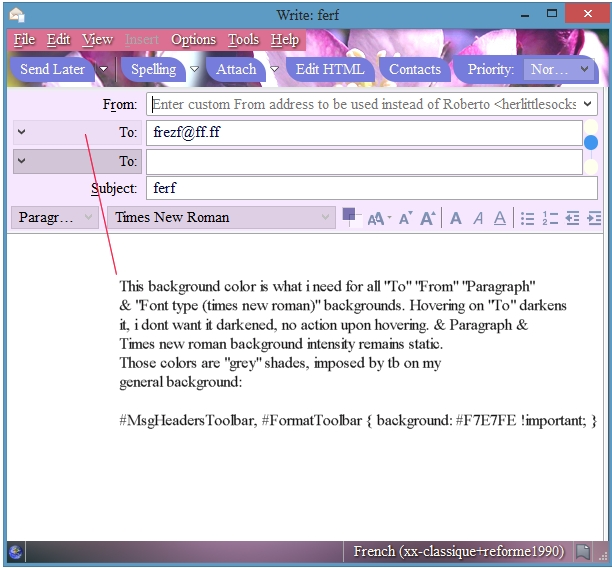
This background color is what i need for all "To" "From" "Paragraph" & "Font type (times new roman)" backgrounds. Hovering on "To" darkens it, i don't want it darkened, no action upon hovering. & Paragraph & Times new roman background intensity remains static. Those colors are "grey" shades, imposed by tb on my general background:
- MsgHeadersToolbar, #FormatToolbar { background: #F7E7FE !important; }
This background color is what i need for all "To" "From" "Paragraph"
& "Font type (times new roman)" backgrounds. Hovering on "To" darkens
it, i don't want it darkened, no action upon hovering. & Paragraph &
Times new roman background intensity remains static.
Those colors are "grey" shades, imposed by tb on my
general background:
#MsgHeadersToolbar, #FormatToolbar { background: #F7E7FE !important; }
Semua Balasan (1)
I suggest you try only of the developer newsgroups. https://groups.google.com/forum/#!forum/mozilla.dev.apps.thunderbird