


When I try to sign on to Thunderbird, it is now asking if i want to set up a new account. It looks like my profile has been lost. Address book is still there.

I have used Thunderbird for some three years, but since attempting to sign in from yesterday it doesn't seem to recognise me. I noticed yesterday that there was an automatic repair done to my computer's C: drive. Instead of my emails appearing, there is a screen asking if I would like to set up a new email address. The option, "skip this and use my existing email address", does not work.
Any help much appreciated.
Semua Balasan (4)
re :there is a screen asking if I would like to set up a new email address.
The info you supplied means on the current profile, Thunderbird does not detect any mail accounts, so asks you if you want to set one up.
Check to see how many profile names you have in the 'profiles' folder.
Make hidden folders and files visible:
In Thunderbird Help > Troubleshooting Information
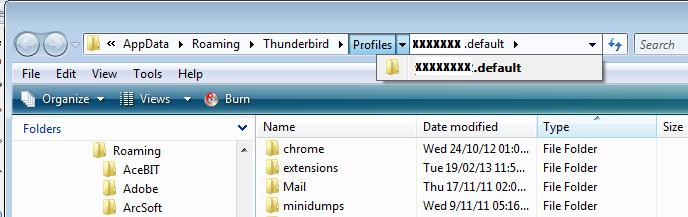
click on 'Show Folder' button a new window opens showing your current profile folder name contents. click on 'Profiles' - see image below. How many profile folder names do you see? A profile folder name is typically called 'xxxxxxxx.default' where the x's are letters and numbers.
In my example it only shows one profile folder name and I'm open on that profile.
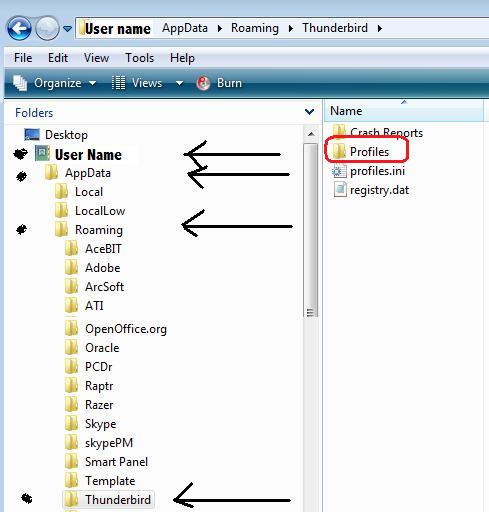
You can also access via: User Name > Appdata > Roaming > Thunderbird > Profiles
Then check to see if there are any mail accounts in all profile folder names.
click on 'Mail' folder to see pop mail account names.
How many profile folder names do you have in the 'Profiles' folder? In the 'Mail' folder - you should see 'Local Folders' plus any other pop mail accounts. Check all profiles...do you see any pop mail accounts listed?
re : I noticed yesterday that there was an automatic repair done to my computer's C: drive
After Automatic Repair has run, a text log with diagnostic information and repair results is usually generated. The log file should be located at: C:\Windows\System32\Logfile\Srt\SrtTrail.txt Maybe it can offer some additional info.
Thanks. There is only one profile name showing (97kqz2tm.default). In the 'Mail' folder it only shows 'Local Folders'
I had hoped that TB had just mislaid the profile and created another default empty one, but unfortunately that is not the case.
If you previously had POP mail accounts, then they would appear in the 'Mail' folder with 'Local Folders'. As there are none, then this explains why TB is asking you to add an existing mail account.
re : automatic repair done to my computer's C: drive. I'm not exactly sure what your computer did. Whether it restored to an earlier point in time or simply removed a load of files that was not part of the original OS installation.
Did you need to reinstall Thunderbird after the repair? Can you see a 'windows.old' folder on your desktop? Did this hold anything useful? - C:\Windows\System32\Logfile\Srt\SrtTrail.txt