Can't see items in Sent Folder- they exist but seem to be white font

The entries are there but they are not viewable in the top list, only when you click on an entry do you see it in the bottom screen. It is as if the font for this Sent folder is now white on the white background.
Looking for suggestions on this issue. I am going to try the repair option after backing up the profile.
This is the Windows version of the software version 38.3.0 is showing as the latest and up to date.
The entries are there but they are not viewable in the top list, only when you click on an entry do you see it in the bottom screen. It is as if the font for this Sent folder is now white on the white background.
Looking for suggestions on this issue. I am going to try the repair option after backing up the profile.
This is the Windows version of the software version 38.3.0 is showing as the latest and up to date.
Semua Balasan (1)
Try this:
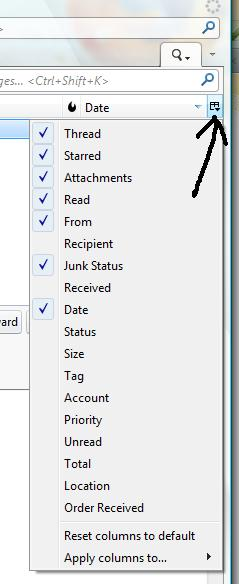
select the 'Sent' folder click on the far right 'Select column s to display' icon select 'Reset columns to default'
see image