


Login to Mozilla support problem

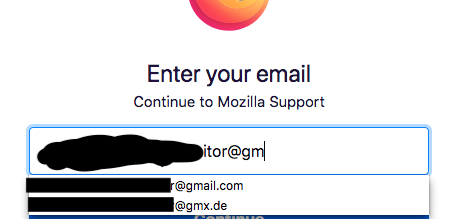
When I log into Mozilla support my saved account Email is typed out to log in and when I get to the last part "@gmail.com" a second login name supposedly from the password list appears but ends with "email@gmx.de"
The email.gmx.de is not in my password list and only shows when logging into Mozilla support. Why doesn't this show in password list? How can I locate the origin?
Összes válasz (3)
Hi, I've never noticed it before. It looks like there's a predefined list of popular e-mail services attached to this field. Just a strange feature of this login form.
Módosította: TyDraniu,
Where are yo finding this information?
Actually I see quite a long list with email providers choices (22) if I type "xx@" and press the cursor Down key.
Saved logins from the Password Manager would have a key icon in front of a suggestion, so you can easily distinguish this.
Módosította: cor-el,